Audit log
The audit log records the actions taken in an organization: who created, changed or deleted which resource, when, and whether it succeeded. Use it to investigate a change, or to show auditors who had access to what.
Open the organization's settings and choose Audit Log. Reading it needs the Owner role, or a custom role with the audit permission. See Members and roles.
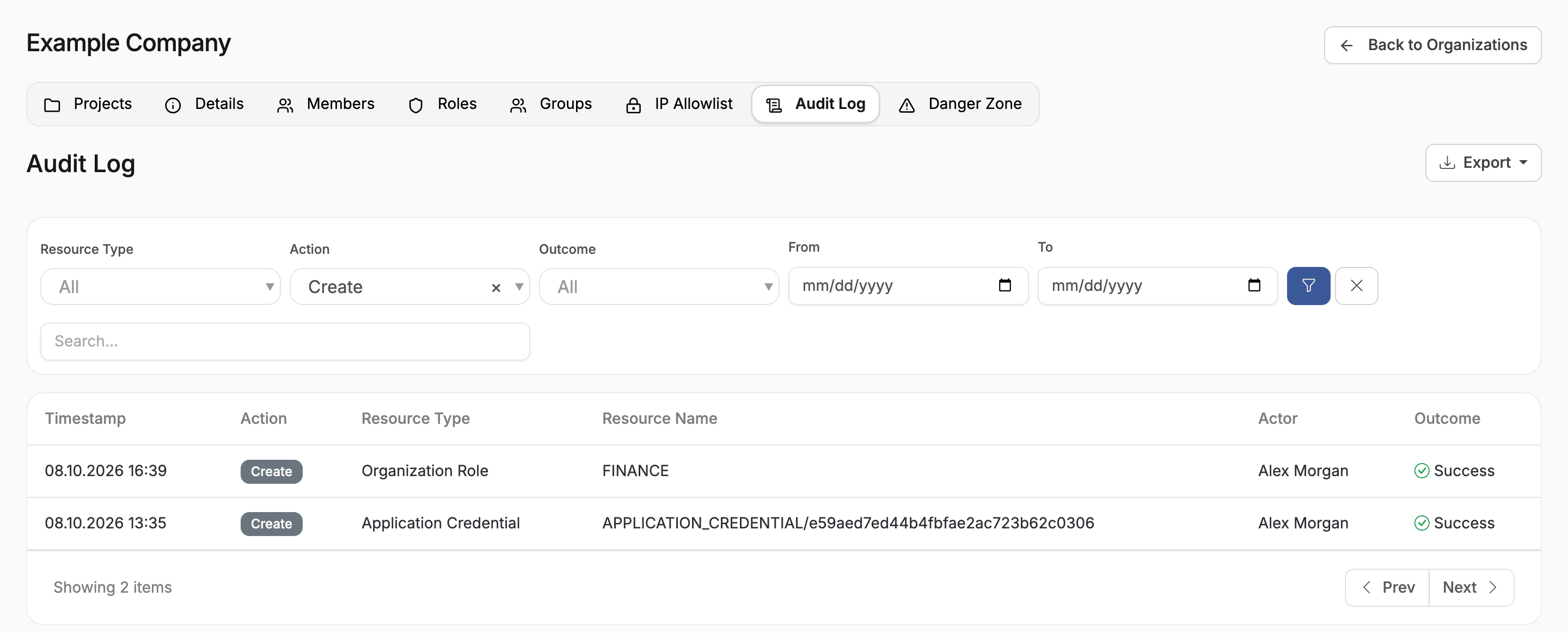
Each entry shows the Timestamp, the Action, the Resource Type and Resource Name, the Actor who acted, and the Outcome. Open an entry to see its details, including the properties it changed, with their values before and after.
Filter the log
Choose any combination of filters, then the filter button:
| Filter | Narrows to |
|---|---|
| Resource Type | One kind of resource, such as Project, Cloud Resource, Billing Profile or Session |
| Action | One action, such as Create, Delete, Resize, Login or Change Role |
| Outcome | Success or Failure |
| From and To | A date range |
| Search | Entries that mention the text, such as a resource or person's name |
The clear button removes every filter.
Export the log
Choose Export, then Export CSV or Export JSON, to download the log for your own records or for an auditor.