Webhooks
A webhook is a POST that OSIE sends to a URL you own the moment something happens on the platform — a bill is created, a payment succeeds, a project is suspended. Your billing system, CRM or ticketing tool reacts to the event as it happens, instead of polling the API for changes it might miss.
Delivery is off until an administrator turns it on, so an upgrade never starts sending traffic out of your platform on its own.
Every event and the exact payload it carries is documented in the webhook reference.
Register an endpoint
Go to Settings > General Settings > Webhooks and turn on Enabled under Outbound webhooks. Then, under
Endpoints, choose Add endpoint:
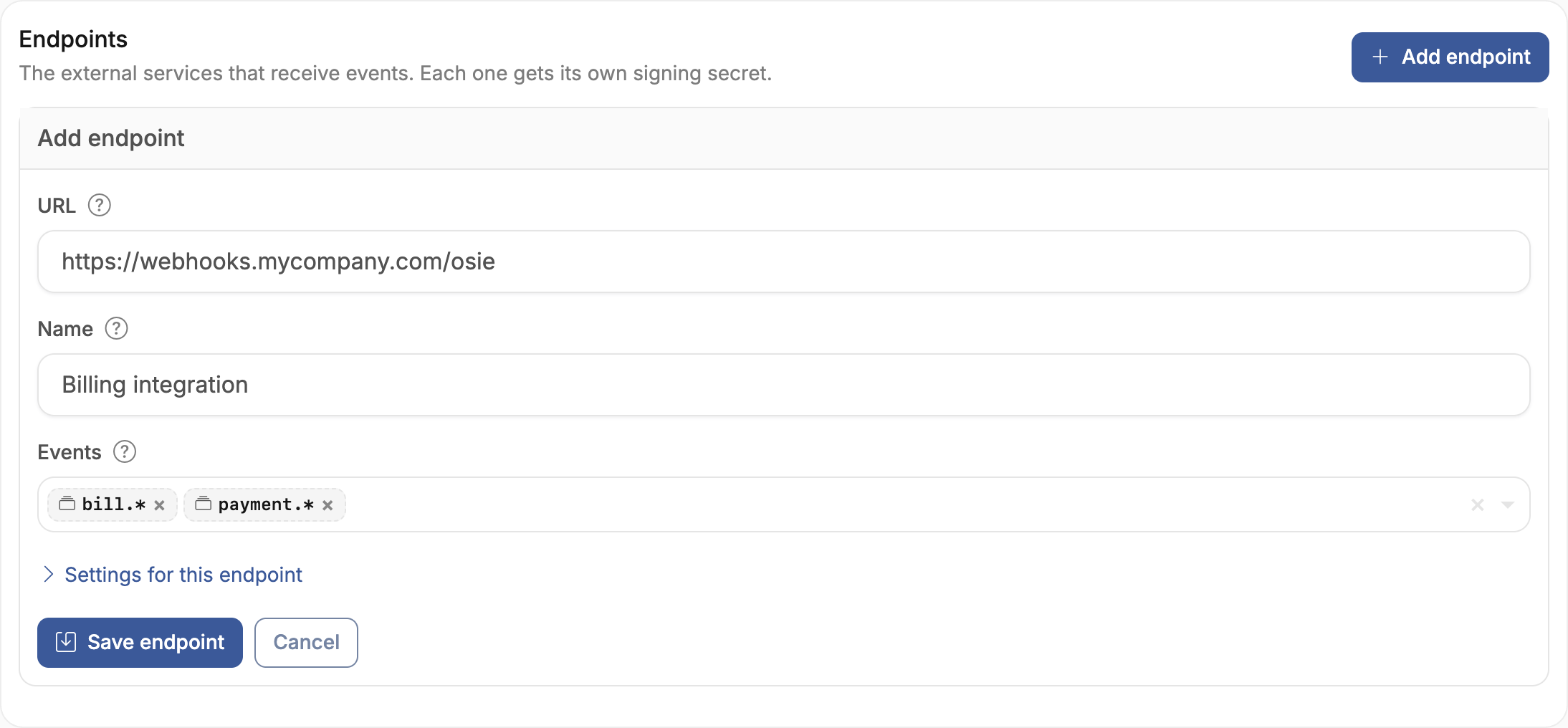
- URL — where deliveries are POSTed. It must be
httpsand resolve to a public address. To accept plain HTTP or an internal address, see Sending to an internal address. - Name — what the endpoint is called in the list. Falls back to the URL when left blank.
- Events — the events this endpoint receives. Pick individual types, or a group such as
bill.*to cover every event in that family, including ones added in later releases.*subscribes to everything.
Saving the endpoint issues its signing secret.
The signing secret is shown once, when the endpoint is saved. Copy it into your consumer before leaving the page — it cannot be displayed again, only replaced by rotating it.
Use Send test event to confirm the endpoint is reachable. It delivers a webhook_endpoint.test
event, which carries no resource and is safe to send at any time.
Verify a delivery
Each request carries the headers below. webhook-signature is absent when payload signing is turned
off; the rest are always present.
| Header | Meaning |
|---|---|
webhook-id | Unique id of this delivery, stable across retries. Deduplicate on it. |
webhook-timestamp | Unix seconds at which the delivery was signed. |
webhook-signature | Space-delimited v1,<base64> signatures over the body. |
osie-event-type | The event type, matching the body's type. |
osie-attempt | 1 on the first try, incrementing on each retry. |
Signing follows the Standard Webhooks specification: HMAC-SHA256
over {webhook-id}.{webhook-timestamp}.{raw body}, base64-encoded and prefixed v1,. Compute it over
the raw body, before any JSON parsing — re-serializing changes the bytes and the signature no longer
matches.
import base64, hashlib, hmac

def verify(secret, headers, raw_body):
    signed = f"{headers['webhook-id']}.{headers['webhook-timestamp']}.{raw_body.decode()}"
    expected = base64.b64encode(
        hmac.new(secret.encode(), signed.encode(), hashlib.sha256).digest()
    ).decode()
    # The header holds several signatures during a secret rotation; any one of them verifying is enough.
    return any(
        hmac.compare_digest(candidate.removeprefix("v1,"), expected)
        for candidate in headers["webhook-signature"].split(" ")
    )
Reject deliveries whose webhook-timestamp falls outside a tolerance you choose, so a captured request
cannot be replayed against you later.
Answer every delivery
Answer with any 2xx status once you have durably accepted the event — persisted it, or queued it for your own processing. Do the work afterwards: OSIE waits 15 seconds for a response, and a handler that finishes its processing before replying will eventually exceed that and be retried for work it already did.
Anything other than 2xx counts as a failure and is retried, including a 3xx redirect. 410 Gone is the
exception: it retires the endpoint permanently and stops delivery.
Deliveries are at-least-once and unordered. The same event can arrive twice, and bill.paid can
reach you before the bill.created that preceded it. Deduplicate on webhook-id, and treat the payload
as the current state of the resource rather than as a step in a sequence.
Retries and endpoint health
A failed delivery is retried on a backoff schedule until it succeeds or runs out of attempts. Every delay is randomised by the jitter percentage, so a platform-wide outage does not recover in lockstep.
| Setting | Default | Effect |
|---|---|---|
| Backoff schedule | 10s, 1m, 5m, 30m, 2h, 5h, 10h, 12h | Delay before each retry. The last entry repeats. |
| Jitter | 20% | Randomises each delay either way. |
| Maximum attempts | 3 | Tries per delivery before it is marked failed. 0 means no limit. |
| Disable after failing for | 3 days | Continuous failure for this long disables the endpoint. |
| Minimum consecutive failures | 3 | Guards against one unlucky burst disabling a healthy integration. |
| Keep failed deliveries for | 30 days | How long a failed delivery stays available to inspect and retry. |
Every row above except retention is a platform default that an individual endpoint can override — a consumer that needs a longer runway gets its own attempt limit without changing anyone else's. Anything left blank on an endpoint follows the platform setting. Retention is storage policy and stays platform-wide.
An endpoint disabled this way stays in the list with its history intact, and an administrator has to re-enable it. Successful deliveries leave the queue and are recorded in the audit log, so an empty Deliveries list means everything got through.
Rotate a signing secret
Choose Rotate signing secret on the endpoint. The replacement is shown once, exactly like the
original. For the length of the Secret rotation overlap — 24 hours by default — deliveries are signed
with both secrets, and webhook-signature carries both. Deploy the new secret to your consumer inside
that window and no delivery is dropped; after it, the old secret stops signing.
This is why a verifier must accept a delivery when any signature in the header matches, rather than comparing against the first one.
Sending to an internal address
By default an endpoint must be https and must resolve to a public address. Two platform settings relax
that, both under Security:
- Allow plain HTTP endpoints — permits
httpdestinations. Payloads then travel in the clear and can be read in transit, signed or not. - Allowed private ranges — one CIDR per line. Endpoints resolving into a listed range are accepted; everything else private is still refused.
Both are platform policy and cannot be overridden per endpoint. Leave them alone unless a consumer genuinely runs on an internal address.
Turning off Sign payloads removes the signature entirely, and a consumer then cannot distinguish a real delivery from a forged one. Only do this for a consumer that cannot verify a signature, and restrict the destination another way.
Troubleshooting
| Symptom | Cause | Fix |
|---|---|---|
| Endpoint refuses to save | URL is http, or resolves to a private address | Use an https public URL, or allow the scheme or CIDR range under Security |
| Endpoint refuses to save, event not recognised | A typo in an event pattern, such as bil.* | Patterns are rejected when they match nothing in the catalogue — check the spelling against the reference |
| Nothing is delivered anywhere | Enabled is off under Outbound webhooks | Turn it on; events are not queued while it is off |
| Signature never matches | Body re-serialized before verifying, or only the first signature compared | Sign the raw bytes, and accept if any signature in the header verifies |
| Deliveries retry despite a 200 | The response arrived after the delivery window | Acknowledge first, process afterwards |
| Endpoint shows Disabled automatically | It failed continuously past the disable threshold | Fix the consumer, then re-enable it with Enable |
| An edit has no effect for a few seconds | Configuration is cached briefly to keep it off the hot path | Wait a few seconds and retry |