Security group templates
A security group template is a set of firewall rules that OSIE creates in every customer project on your OpenStack clouds. It gives every tenant the same baseline network access — SSH from your management network, ICMP for monitoring, HTTPS from anywhere — without each customer writing the rules, and without projects created months apart ending up with different defaults.
Templates are platform-wide. A template applies to every OpenStack cloud unless you narrow it to chosen cloud providers and regions. Clouds using the Single shared project authentication mode and regions without a networking service are skipped.
Template delivery to projects
OSIE applies the enabled templates whenever a project is attached to its clouds:
- a customer or an administrator creates a project;
- a billing profile is activated, which provisions the projects that were waiting for it;
- an administrator adds a cloud provider to an existing project, which re-applies the templates on every cloud of that project.
Projects that already exist when you create or change a template receive it only when you apply the templates to existing projects. The same goes for projects imported from an OpenStack domain, which OSIE does not provision.
Applying only ever adds:
- A group that is missing is created, and a rule that is missing is added.
- A group the project already has under the template's name, compared case-insensitively, is adopted, and only its missing rules are added.
- Two rules are the same rule when their direction, IP version, protocol, ports and source match. The description is not compared.
Nothing is ever removed from a project. Dropping a rule from a template, disabling the template or deleting it leaves every group and rule already created in projects in place. A failure in one project or region is logged and never stops the project from being provisioned.
Choose a mode
| Mode | Effect in each project |
|---|---|
| Create a new group | Creates a security group named after the template, holding its rules. |
| Merge into the default group | Adds the rules to the default security group OpenStack keeps in every project. |
A merge template is always named default, and you can have several of them — for example, one per
cloud provider, each with the rules that cloud needs.
The mode and the name are fixed once the template is saved. To change either, delete the template and create a new one; the groups it already created in projects stay.
Write the rules
Each rule has a direction, an IP version, a protocol, a port range and a source. Presets add the common rules in one step: SSH, HTTP, HTTPS, RDP, ICMP, and all egress traffic.
- Protocol left empty matches every protocol. A port range requires a protocol.
- Ports for ICMP are the ICMP type and code. Fill in both fields, or leave both empty to allow all ICMP.
- Source is either a CIDR or a group name:
default, or the group of another template. A group source is resolved in each project to that project's own group, so a rule such as "allow everything from members ofweb" means the same thing in every tenant.
A group used as a source must exist in the project. Where it does not — its template is disabled, or scoped to other clouds — the rule is skipped in that project and reported as a failure. A template whose group another template's rule uses as its source cannot be deleted until that rule is removed.
Create a template
Go to Settings > Services > Instance Settings, open the Security Groups tab and choose
Create new.
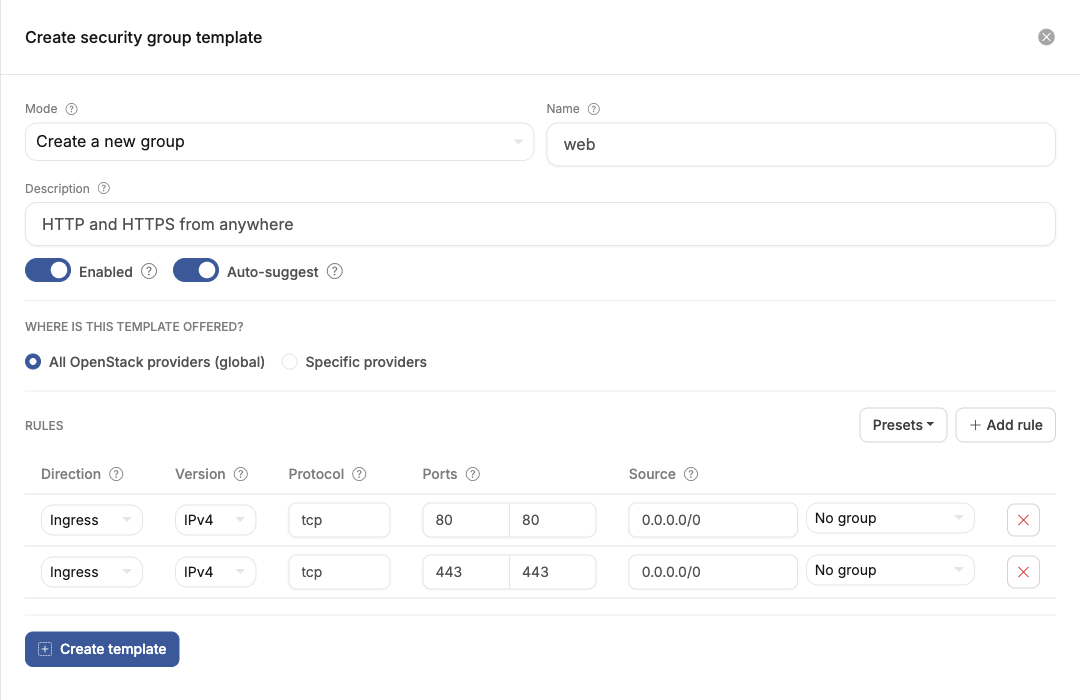
- Choose the Mode and enter the Name.
- Add the rules.
- Under Where is this template offered?, keep All OpenStack providers or choose Specific providers, optionally narrowed to regions.
- Leave Enabled on. A disabled template is neither applied nor suggested.
- Turn on Auto-suggest if the group should be pre-selected when customers create an instance — see below.
- Choose Create template.
The template is applied to new projects from then on. Existing projects need the next step.
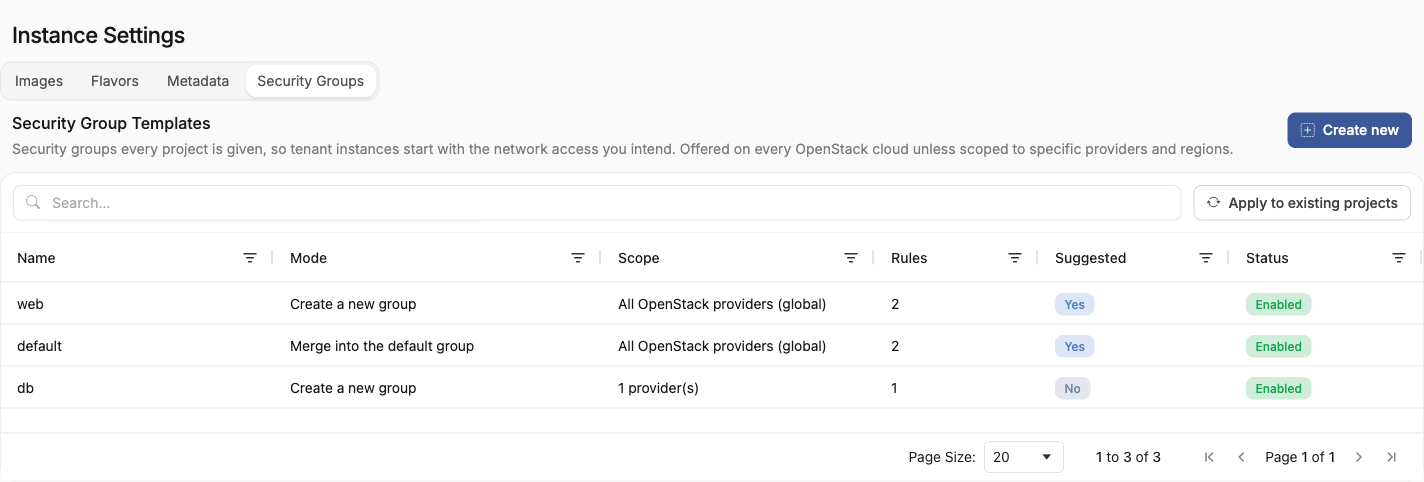
Apply to existing projects
Apply to existing projects runs every enabled template against every project, on every cloud the template covers. Projects scheduled for deletion and disabled clouds are skipped; suspended projects are included. When it finishes, OSIE reports how many projects it processed and changed, and how many groups and rules it added.
Applying restores what customers removed. A template group that a customer deleted or renamed is created again, and a rule they deleted from it is added back.
Suggest the group at instance creation
With Auto-suggest on, the template's group is pre-selected in the customer's create-instance form for every location the template covers. The customer can remove it before launching.
Turn it on for your merge templates if customers should keep the default group. OpenStack attaches
default to an instance only when no security group is named at launch, so an instance launched with
any other group selected runs without it.
Template groups in customer projects
The groups are ordinary security groups in the customer's project, listed with the rest and carrying no marking. Customers can add rules to them, change them and delete them. What they change is theirs until the next time you apply the templates to existing projects.
Permission to manage templates
Managing templates requires the admin:security_group_template:manage permission. The built-in
SUPER_ADMIN role holds it and ADMIN does not; to delegate the task, grant the permission through a
custom role — see Roles and permissions.
Creating, changing, deleting and applying templates is recorded in the audit log.