Repositories
A repository stores backup data and defines its storage and retention settings. Register an S3 bucket, Ceph pool or mounted filesystem with the site whose movers access it. The repository provides:
- Backup data: the backups' data, split into 4 MiB chunks. Each chunk is compressed, encrypted when a key manager is configured, and stored once under a name derived from its content. Each backup also has one manifest that lists its chunks. Identical data written by any backup in the same encryption domain is stored once. Expiring a backup frees only the chunks no other backup refers to. Every backup describes itself, so a fresh installation can read a repository back after losing its database.
- Retention rules: whether it locks objects against deletion, and if so the shortest and longest a backup may be kept there (immutable backups). It also sets how long a deleted backup stays recoverable (soft delete).
- Maintenance: sweeps that reclaim unreferenced data, background verification, and the usage each project is billed on.
Register a repository before creating protection policies. Each policy selects a repository for its backups. Projects access it through a vault, which provides a name, description and manual backup limits.
There are two kinds:
| Kind | Storage | Holds |
|---|---|---|
| Backup repository | An S3 bucket, a Ceph pool, or a mounted filesystem | Every backup, for as long as its policy keeps it: deduplicated, compressed, and immutable when the bucket has Object Lock. A policy names one for its backups, and optionally a second for a copy of each. |
| Instant-restore tier | A Ceph pool of its own, in the production cluster | A policy's recent backups as Ceph images, copied there after each backup. Restoring a volume from it is a clone that takes seconds. No deduplication and no lock. A policy names one with --instant-repository. |
Every deployment needs a backup repository. Register one with --kind chunk, the default, and
--driver s3, rados or posix. Register an instant-restore tier the same way, with
--kind rbd --pool <pool> in place of the bucket and credentials.
Create the bucket
Create the bucket in your object storage before registering it. Registration records what you give it and does not check the bucket. A missing or misspelled bucket shows up at the first backup as bucket … does not exist.
For immutable backups, create the bucket with Object Lock enabled and no default retention rule, and register it as Immutable backups describes.
Register a repository
ferry repository register \
  --name primary \
  --site <site> \
  --driver s3 \
  --endpoint https://s3.mycompany.com \
  --bucket backups-primary \
  --region <region> \
  --access-key <access-key> \
  --secret-key <secret-key> \
  --soft-delete-grace 14d
--sitemust be the site the movers belong to (ferry_site_nameon kolla-ansible,cloud.sitewith Helm,site-namewith Juju). Movers take work only from their own site, so a repository registered under another site name receives none.--access-keyand--secret-keyare sealed with the deployment's key manager as they arrive. On a deployment without one (none), they are stored as given. They can never be read back. You can only replace them withferry repository update. If you leave both out, the movers use the credentials in their own environment. That means one credential for every repository in the site.--soft-delete-graceis how long a backup or plan a tenant deletes stays recoverable by an operator before it is erased. With0, a delete is final. On a repository without a lock, this grace allows an operator to recover backups deleted with a compromised project token. We recommend keeping a grace period.--chunk-sizedefaults to 4 MiB and is fixed at registration.
The rados and posix drivers take a pool or a path in place of the bucket. Object Lock, and with it
immutability, needs s3.
Register an instant-restore tier
ferry repository register \
  --name fast \
  --site <site> \
  --kind rbd \
  --pool ferry-tier
An instant restore clones a copy out of the tier pool, and Cinder adopts the clone. Until the service
has flattened it in the background, every read of that volume goes back to the tier pool: Cinder's, when
it adopts the volume, and Nova's, when it attaches it. So the Ceph user Cinder and Nova attach volumes
with needs read access to the tier pool. On kolla-ansible this is client.cinder. ceph auth caps
replaces the whole list, so repeat the existing caps:
ceph auth get client.cinder
ceph auth caps client.cinder mon 'profile rbd' \
  osd '<the existing osd caps>, profile rbd-read-only pool=ferry-tier'
On kolla-ansible, tools/create-cephx.sh checks this user and prints the command with its existing caps
filled in.
Without the access, every instant restore fails with Cinder could not open the clone; its Ceph identity
needs read access to tier pool ferry-tier until the flatten finishes.
Cinder adopts each clone in the service's own project before handing it to the restoring project, so that project's volume quota must leave room for the restores that run at the same time.
Offer a repository to projects
A repository is used through a policy that writes to it. Projects see it through its vault:
- Write a policy whose backup repository is this one.
- Give it a vault, so projects see where their backups are kept, and can take manual backups there.
Monitor repository usage
In the operator console, open Repositories and select a repository to check its retention contract and storage usage by project.
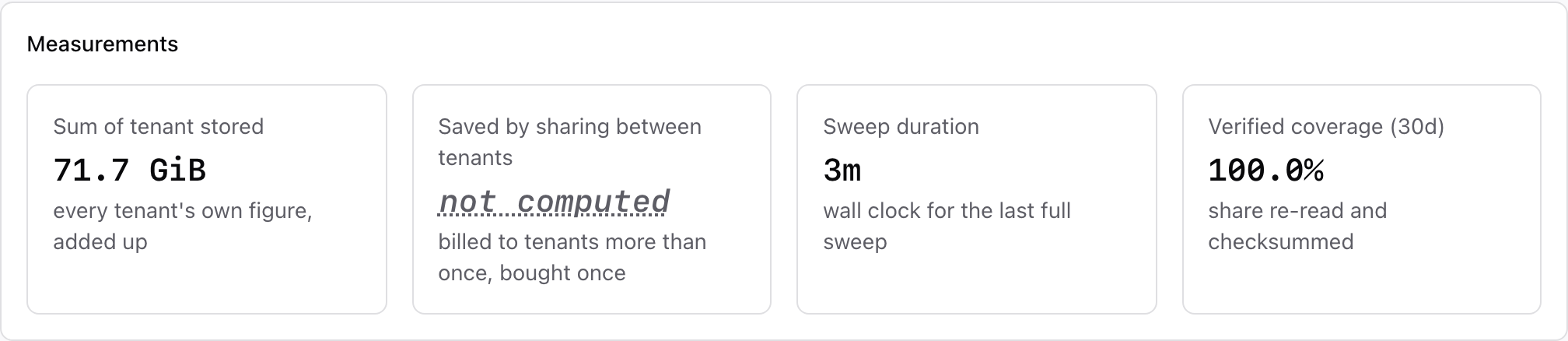
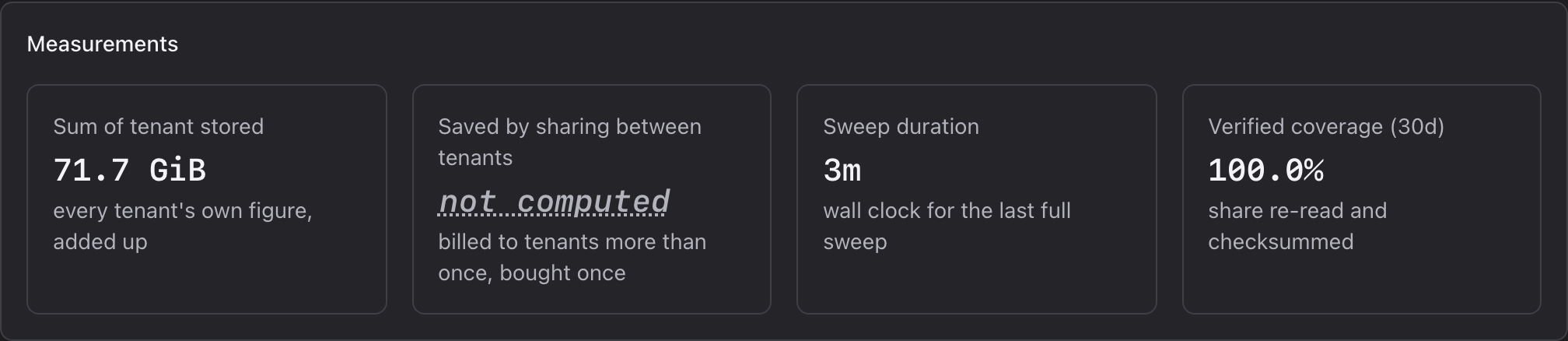
The same figures are available from the CLI:
ferry repository list
ferry repository usage <repository-id>
| Figure | Meaning |
|---|---|
| Physical bytes | What the bucket holds. |
| Referenced by tenants | The sum of each project's footprint. Larger than physical bytes when projects share data. |
| Reclaimable | Data no backup refers to any more, removed at the next sweep. |
| Verified, last 30 days | The share of backups read back and checked in the last 30 days. |
Sweeps remove the chunks no backup refers to any more and measure each project's footprint. By
default they run at most every six hours (gc.min_interval in the manager's configuration). A
project's stored figure, which billing reads, changes only when a sweep completes. A sweep that finds a
broken backup stops reclaiming space in that repository until the backup is dealt with.
System health reports this.
Verification re-reads backups in the background and checks them against their checksums, a few at a time, so every backup is read back periodically.
Update or remove a repository
ferry repository update <repository-id> changes the endpoint, the region, the credentials or the
soft-delete grace.
ferry repository delete <repository-id>
A repository that still holds locked data cannot be removed. The refusal names what it still holds.