Write protection policies
A protection policy defines a backup schedule, retention periods, storage and recovery targets. As an operator, you create policies that your storage and backup capacity can support. Project members select a policy for each plan. They cannot edit policies or shorten retention with a project token. Mandatory policies also prevent them from pausing or deleting plans.
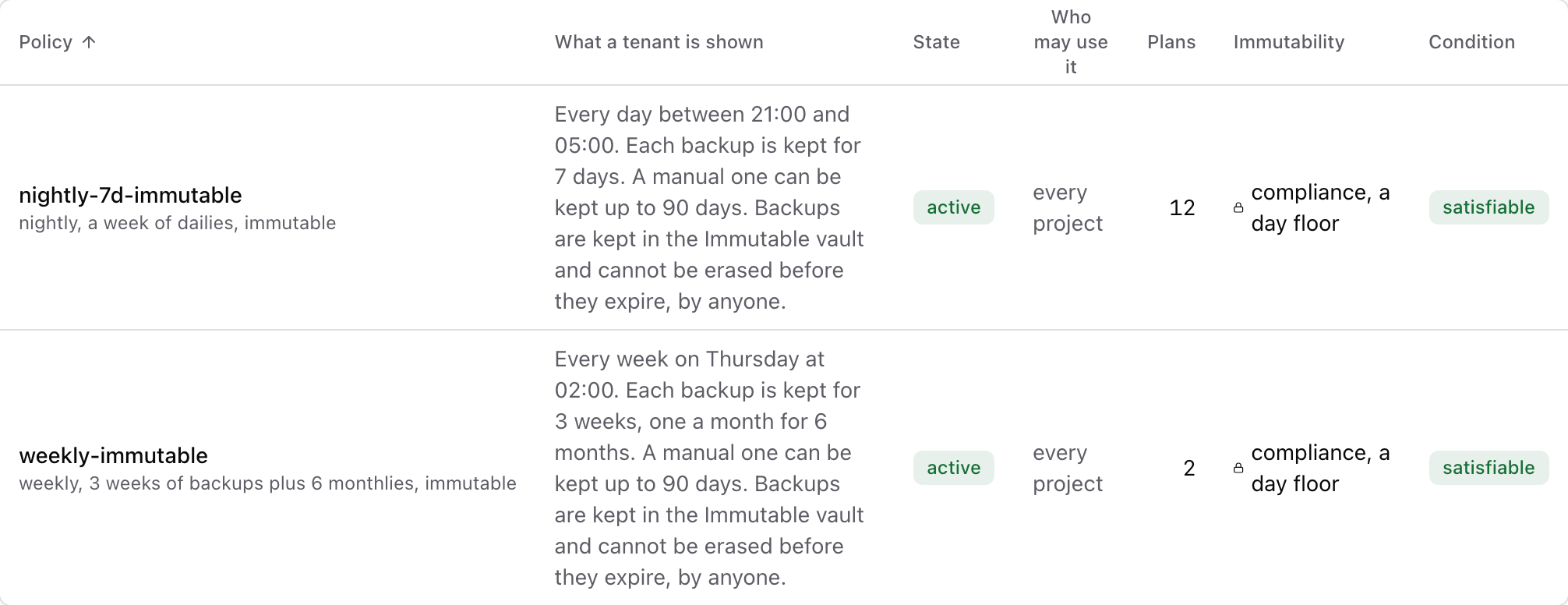
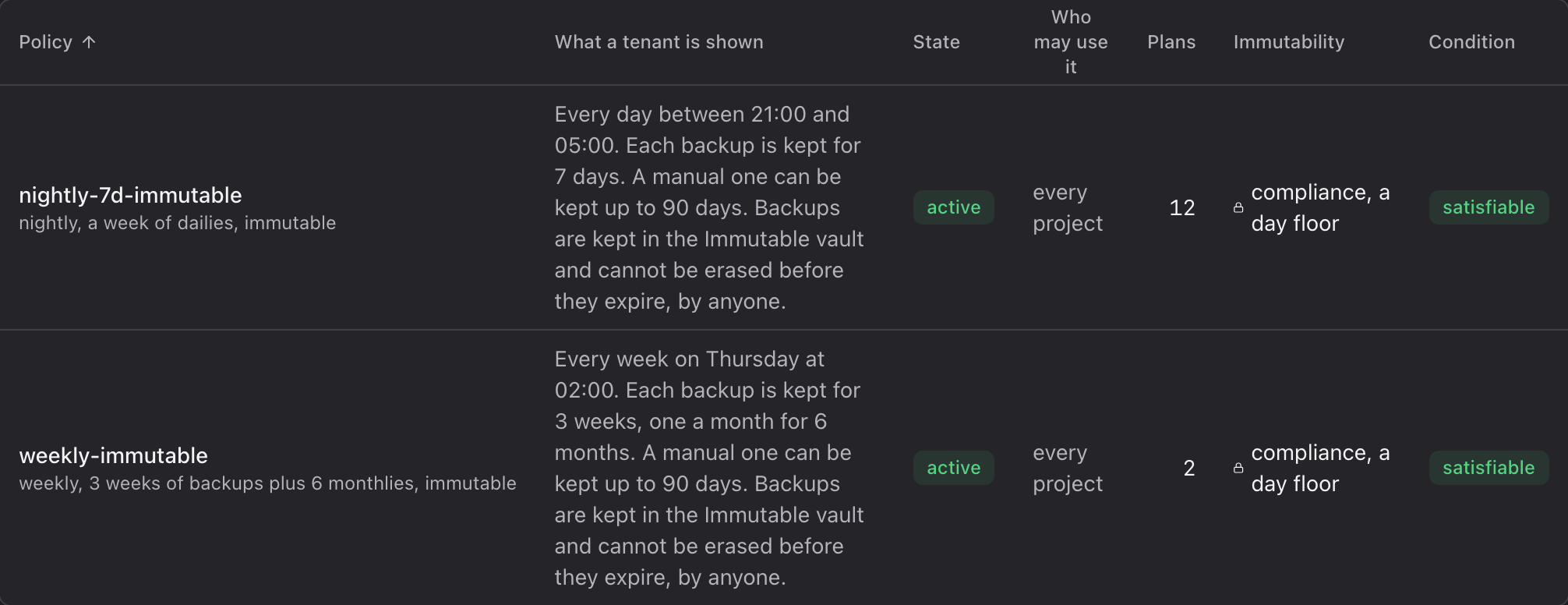
A project sees a policy as its name and one sentence derived from it, for example:
Every day between 21:00 and 05:00. Each backup is kept for 7 days, one a month for 6 months. A manual one can be kept up to 90 days. Backups are kept in the Immutable vault and cannot be erased before they expire, by anyone.
The last part, about deletion, appears only when the policy's repository is locked.
Use Protection policies in the operator console to manage policies and check whether their repositories can meet the configured retention requirements.
Create a policy
- Console
- CLI
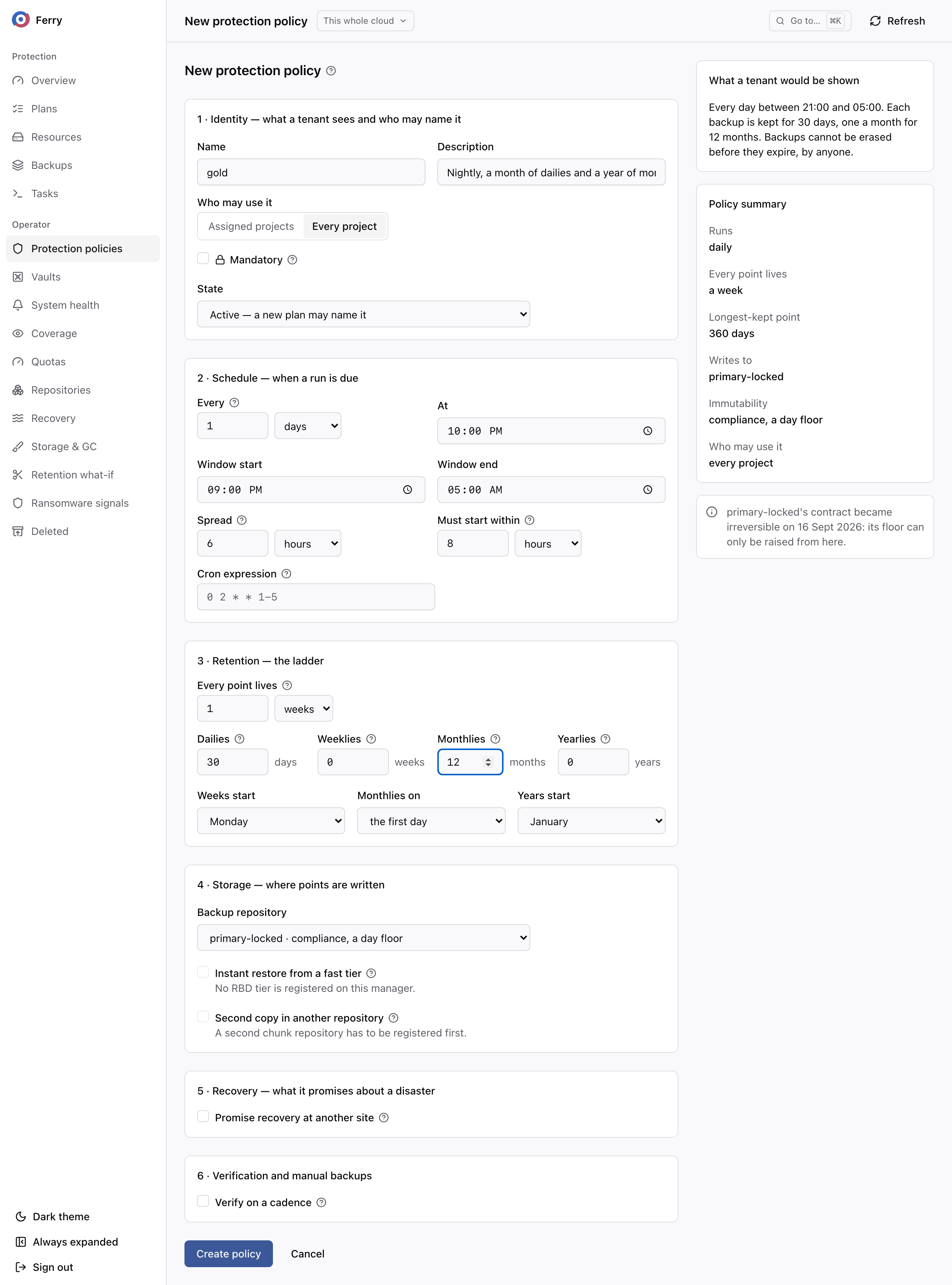
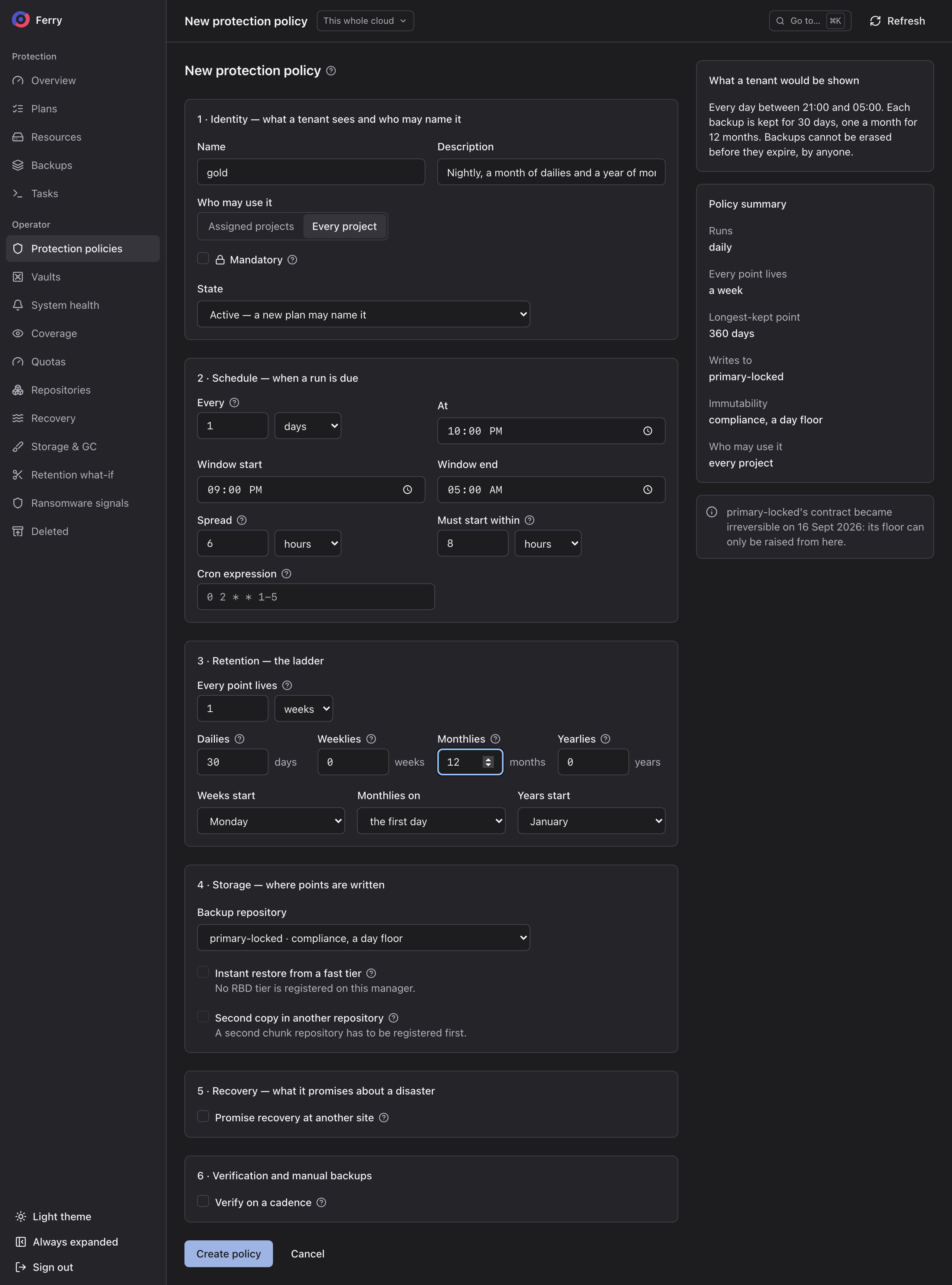
In the operator section, open Protection policies and choose New policy. The panel on the right shows What a tenant would be shown as you fill the form in.
ferry policy create \
  --name gold \
  --description "nightly, a month of dailies, a year of monthlies" \
  --visibility public \
  --every 24h --at 22:00 \
  --window-start 21:00 --window-end 05:00 \
  --jitter 6h --start-within 8h \
  --keep "all=7d,daily=30,monthly=12" \
  --anchors "week=sunday,month=first,year=january" \
  --backup-repository primary-locked
--from-file <policy.yaml> reads the same fields from a file, which suits keeping policies in git.
Schedule
| Console | CLI | Meaning |
|---|---|---|
| Every | --every | The cadence, from 15 minutes to 7 days. Below a day, it must divide 24 hours. From a day up, it must be whole days. A cadence of whole weeks runs on a fixed weekday, counted from 1 January 1970, a Thursday. |
| At | --at | The time of day a cadence of a day or longer runs, in the manager's time zone. |
| Window start, Window end | --window-start, --window-end | Backups start only inside this window. |
| Spread | --jitter | Start times are spread over this period, so a thousand plans on one policy do not start in the same second. |
| Must start within | --start-within | A backup that has not started by then is recorded as missed and is not run late. A plan that fell behind never sends two backups of one resource into production storage at the same time. |
| Cron expression | --cron | For schedules a cadence cannot state, such as weekdays only. Projects are never shown the expression. |
Schedules are read in the time zone set by retention.timezone in the manager's configuration
(ferry_retention_timezone on kolla-ansible). When it is unset, they are read in the manager host's
own time zone. A daily schedule keeps its wall-clock time across daylight saving changes.
Retention
Set a minimum retention period for every backup, then longer periods for selected daily, weekly, monthly or yearly backups:
| Console | CLI --keep | Meaning |
|---|---|---|
| Every point lives | all=7d | Every backup is kept at least this long. It must be a duration, because a lock needs a date. |
| Dailies | daily=30 | The first backup of each day is kept for this many days. |
| Weeklies | weekly=12 | The first backup of each week, this many weeks. |
| Monthlies | monthly=12 | The first backup of each month, this many months. |
| Yearlies | yearly=7 | The first backup of each year, this many years. |
Weeks start, Monthlies on and Years start (--anchors) set where those periods begin.
The service assigns a backup's retention roles and expiry date when it completes. The expiry stays fixed unless an operator explicitly applies a retention change to existing backups. One backup can hold several roles. The first backup of 1 January is that day's daily, that month's monthly and that year's yearly. It is also that week's weekly when no earlier backup fell in its week. It is kept as long as the longest of its roles. When a scheduled backup is missed or fails, the role passes to the next backup that completes in the period. A manual backup takes no role, and keeps the date it was given.
Projects see a retention summary: "Each backup is kept for 7 days, one a month for 6 months." The summary combines periods already covered by the schedule, such as seven daily backups on a nightly schedule.
Storage
Backup repository (--backup-repository) is the repository every backup is written to. It decides
whether the policy is immutable. A policy on a locked repository must keep every backup for at least
the repository's floor. A policy that would not is refused, and the refusal names the floor.
Two optional tiers need repositories of their own:
- Instant restore from a fast tier (
--instant-repository,--instant-within) copies each new backup to a Ceph pool next to production and keeps it there for that period. Restoring a volume from it is a clone that takes seconds. The policy's sentence says Restorable in seconds only where the tier can serve restores. The tier must be registered with read access for Cinder. - Second copy in another repository (
--copy-repository,--copy-keep) copies every backup to a second repository with its own retention periods.
Verification
Verify on a cadence (--verify-every) re-reads the newest backup of every plan under the policy,
end to end, on that cadence. This is in addition to the background verification every repository gets.
Availability to projects
| Console | CLI | Meaning |
|---|---|---|
| Every project | --visibility public | Any project in the cloud may choose it. |
| Assigned projects, with Domains and Projects | --visibility assigned, then ferry policy assign | Only the domains and projects you assign may choose it. This is the default. |
| Mandatory | --mandatory | A project cannot pause or delete a plan under it, delete its backups, or move a plan off it. Only an operator can. |
ferry policy assign --project <project-id> <policy-id>
ferry policy assign --domain <domain-id> --remove <policy-id>
Manual backups
The vault associated with the policy's repository sets the limits for manual backups. It sets how long one may be kept, and how many may be taken per day. The policy sentence names the vault and its limit.
Change a policy
Policy changes apply to future backups by default. Existing backups keep their expiry dates.
To change existing expiry dates, select Apply the new ladder to points already written, or use
ferry policy update --apply-to-existing <policy-id>. Lengthening is an ordinary edit. Shortening is a
separate permission, policy:shorten, so you can require a second role for it. On a locked repository,
it cannot shorten anything still held. Preview the effect first:
ferry retention simulate --policy <policy-id> --keep "all=7d,daily=14"
The console's Retention what-if page shows the same preview: what would be kept, what would expire, and what the lock still holds.
Withdraw and retire a policy
| Action | Effect |
|---|---|
ferry policy deprecate <policy-id> | No new plans may choose it. Plans already on it keep running, and coverage reports them. |
ferry policy retire --successor <successor-id> <policy-id> | Every plan moves to the successor in one step, and backups keep their dates. The successor must protect at least as well. A shorter retention, a lower floor, no lock, a slower cadence or dropping mandatory is refused. |
ferry policy delete <policy-id> | Only for a policy no plan uses, counting deleted plans still inside their grace period. |
Policies that cannot be served
A policy whose repository is gone, unhealthy, of the wrong kind or unable to hold its retention is marked cannot be served. Its plans take no backups, and both the plans and the policy show why. Nothing is moved to other storage. Fix the repository or edit the policy. A repository that fails its health probe counts as unhealthy for as long as it fails. Each scheduled backup in that time is recorded as missed immediately, with the reason. The plans take their next scheduled backup once the repository passes again.