Disaster recovery
Disaster recovery restores a region's servers and volumes in another region after an outage. Each region runs its own Ferry and database. The services exchange backups and recovery records through storage accessible to both regions. Recovery can proceed while the source region is unreachable.
As an operator, you can bind individual resources to a project in the recovery region. For servers that must recover together, create a protection group with a boot order and health checks, then fail over the group.
Data shared by the two regions
| What | Carried by | Written by | Read by |
|---|---|---|---|
| Backups | The backup repository, its replica, or the policy's copy repository | The region that took them | The other region, every five minutes |
| Protection group documents: members, boot order, health checks and disks | The same repositories | The group's home region | The recovery region |
| Release, recovery, readiness and test records | The same repositories | Each region, for what it did | The other region |
| Mirror snapshots of Cinder volumes, on the hot tier | rbd-mirror, between the two Ceph clusters | The cluster that holds the primary image | The other cluster |
Each region uses its own Keystone credentials and Ceph keys. Group documents and recovery records use the same encryption key as the members' backups. Import that key in the recovery region to read both the backups and records.
Choose a recovery tier
A policy defines one of three recovery tiers. The data prepared in the recovery region determines the recovery point and recovery time:
| Tier | The recovery region recovers from | Recovery point | Recovery time |
|---|---|---|---|
cold | The newest backup it holds, restored into new volumes | The policy's cadence, plus up to five minutes until the recovery region next reads the repository | Grows with the size of the disks |
warm | A standby per disk, brought up to date as each new backup arrives | The cadence, plus that read and the replay | The time to clone the standbys and boot |
hot | Cinder volumes mirrored by rbd-mirror in snapshot mode | The mirror snapshot interval | The time to promote the images and boot |
Every tier reads each server's flavor, ports, security groups and key pair from its newest backup. A hot server therefore still needs a plan and backups.
Prepare cold recovery
Give the recovery region access to the repository and its encryption keys. See Prepare the recovery region.
Prepare warm recovery
- A standby pool in the recovery region's Ceph cluster, set aside for standbys. Every replay overwrites the images it holds.
- The restore user,
client.ferry-restore, granted that pool, because a replay is a restore. A pool granted only to the movers fails with Operation not permitted, naming an image that does not exist yet. - Read access to that pool for Cinder's Ceph user, and for the user Nova attaches volumes with. A
volume recovered or tested from a standby is a clone of one of its snapshots, so Cinder and Nova read
the standby through it. Without that access a recovery fails with
clone_unreadable.
Add each grant to the user's existing capabilities:
ceph auth get client.ferry-restore
ceph auth caps client.ferry-restore mon '<existing mon caps>' osd '<existing osd caps>, profile rbd pool=<standby-pool>'
ceph auth get client.<cinder-user>
ceph auth caps client.<cinder-user> mon '<existing mon caps>' osd '<existing osd caps>, profile rbd-read-only pool=<standby-pool>'
Repeat the last two commands for Nova's Ceph user when it is a different one.
Prepare hot recovery
- Snapshot-mode rbd-mirror on the Cinder pool, set up by the storage operator on both clusters. That
means pool mirroring in image mode, a peer bootstrapped in direction
rx-tx, and an rbd-mirror daemon on each cluster. Both directions are needed, because a failback runs the mirror backwards. Ferry never creates, peers or reconfigures any of it. - The pool is one of the volume pools Ferry reads (
ferry_ceph_volume_poolson kolla-ansible). Add a pool created for a mirrored volume type there too. - The manager's Ceph user has read-write access to that pool in each region
(
profile rbd pool=<cinder-pool>). It promotes and demotes the images, enables mirroring on them, takes the mirror snapshots and clones them for tests. The movers and the restore user need only the access they have on every volume pool. - Every disk of a hot server is a Cinder volume in that pool. A server whose root disk is a local Nova disk cannot be hot.
- A manager with librbd 19 (Ceph Squid) or newer, for tests. A hot test clones a mirror snapshot by
its id, which needs it. The manager image ships with librbd 19. Without it a hot test is refused with
mirror_unavailable. Recover, release, failback and resync still run.
Two settings, both off by default, let Ferry act on the mirror itself:
| Setting | When on |
|---|---|
ceph.mirror.enable_images | It enables snapshot mirroring on the volumes of a hot group's members where the group runs. When off, a volume that is not mirrored is named and its group reads as unprotected. |
ceph.mirror.drive_schedule | It takes the mirror snapshots of hot groups' volumes. When off, the mirror's own snapshot schedule takes them and Ferry only reads their state. Leave it off where your Ceph deployment already schedules mirror snapshots. |
GET /v1/capabilities says whether the hot tier runs in a region. Its dr_reason names the mirrored
pool and its peers, or says why no pool qualifies.
Turn on disaster recovery
Disaster recovery is off by default. Each region's manager needs dr.enabled before any group can be
registered, released, recovered, tested, resynced or retired there. Turn it on in both regions.
While it is off, every one of those requests is refused with dr_not_enabled. The console hides
Protection groups and Test bubbles, and both command lines stop before they send anything.
Recovery bindings, standbys and copy tiers work without it.
Check a region with a project token:
curl -s https://backup.mycompany.com/v1/capabilities \
  -H "X-Auth-Token: $(openstack token issue -f value -c id)" | jq '{dr, dr_reason}'
{
  "dr": false,
  "dr_reason": "Failover is not enabled on this cloud: no release, recover, test, resync or retire can start here."
}
Once it is on, dr is true and dr_reason says which operations and which tiers run in that region.
dr stays false when the manager cannot act in a project. That happens when it signs in to Keystone
with an application credential alone, and dr_reason then asks for keystone.username and
keystone.password.
- kolla-ansible
- Helm
- Juju
In /etc/kolla/globals.yml:
ferry_dr_enabled: true
ferry_dr_probe_image: ferry-probe
ferry_dr_probe_flavor: <probe-flavor>
Then deploy:
PLAYBOOK=$(dirname $(which kolla-ansible))/../share/kolla-ansible/ansible/ferry.yml
kolla-ansible deploy -i /etc/kolla/inventory -i /etc/kolla/ferry-groups -p $PLAYBOOK
| Variable | Default |
|---|---|
ferry_dr_enabled | false |
ferry_dr_probe_image | empty |
ferry_dr_probe_flavor | empty |
ferry_dr_probe_direct | false |
ferry_dr_run_deadline | 12h |
ferry_ceph_mirror_enable_images | false |
ferry_ceph_mirror_drive_schedule | false |
helm upgrade --install ferry deploy/helm/ferry -n openstack --reuse-values \
  --set dr.enabled=true \
  --set dr.probe.image=ferry-probe \
  --set dr.probe.flavor=<probe-flavor>
| Value | Default |
|---|---|
dr.enabled | false |
dr.probe.image | empty |
dr.probe.flavor | empty |
dr.probe.direct | false |
dr.runDeadline | 12h |
ceph.mirror.enableImages | false |
ceph.mirror.driveSchedule | false |
juju config ferry dr-enabled=true dr-probe-image=ferry-probe dr-probe-flavor=<probe-flavor>
| Option | Default |
|---|---|
dr-enabled | false |
dr-probe-image | empty |
dr-probe-flavor | empty |
dr-probe-direct | false |
dr-run-deadline | 12h |
mirror-enable-images | false |
mirror-drive-schedule | false |
Each deployer writes these manager settings:
| Setting | Meaning |
|---|---|
dr.enabled | Lets this manager register, release, recover, test, resync and retire protection groups. |
dr.probe.image | The Glance image, by name or id, that a recovery boots on each tier's network to run health checks. A test's jump host uses it when its bubble policy names no image. |
dr.probe.flavor | The flavor for that host. Required with dr.probe.image. |
dr.probe.direct | Runs a recovery's health checks from the manager itself, which must then reach tenant networks. |
dr.run_deadline | How long a run may last before it stops. A test also stops at its bubble policy's maximum duration. |
ceph.mirror.enable_images, ceph.mirror.drive_schedule | See Prepare hot recovery. |
A group whose members declare health checks cannot be recovered in a region that has neither a probe
image nor dr.probe.direct. Health checks and the probe host
explains how the checks run.
Upload the probe image
The probe host boots the ferry-probe image. It runs the probe once at boot, reads its plan from the
config drive and writes each result to its serial console, where the manager reads it.
Each release from 0.16.1 comes with the image, ferry-probe-<version>.qcow2, and its checksum file.
Check the image, then upload it to Glance in every region that recovers or tests groups:
sha256sum -c ferry-probe-<version>.qcow2.sha256
openstack image create ferry-probe --disk-format qcow2 --container-format bare \
  --property hw_serial_port_count=1 --public --file ferry-probe-<version>.qcow2
To build the image yourself, run test/lab/images/ferry-probe/build.sh from the release's source. Run it
as root on a Linux host with qemu-img, qemu-nbd, rsync, sfdisk and e2fsprogs, and with the
nbd kernel module loaded with max_part above 0. It writes ferry-probe.qcow2.
- The image must be visible to every project that boots it: the project of each bubble policy, and each
project groups are recovered into.
--publicdoes that. A private image must be shared with each of those projects instead. - The probe takes its address by DHCP, so the subnets it lands on need DHCP enabled.
- The smallest flavor works: 1 vCPU, 256 MiB of memory and a 1 GiB root disk.
- The image is a partitioned disk. Nova 2025.1 refuses to boot an unpartitioned raw filesystem image.
- Where the manager can reach tenant networks, set
dr.probe.directinstead, and no probe host boots.
Prepare the recovery region
- Deploy the service in the recovery region with a site name of its own (
ferry_site_nameon kolla-ansible,cloud.sitewith Helm,site-namewith Juju). - Register the repository there. Use the same bucket and prefix, with credentials that may read
it, as Repositories describes. The registration is refused
when this region cannot list the bucket. The recovery region may read a replica made by your object
storage's own replication. In that case, register the replica and say what it replicates with
--replica-of <repository-id>(openstack backup repository create). - Import the encryption keys. Encrypted backups open only where their key is. Export each key from the region that wrote the backups and import it into the recovery region, as Encryption describes. Unencrypted backups need no key. A region without a key manager can hold no imported key, so it recovers only groups and resources whose plans use no encryption.
The recovery region then reads the repository every five minutes.
A failback runs the same way in the other direction. The recovery region's own policy must write to a repository the home region reads, and the home region must hold the recovery region's keys.
Inspect recovery resources
In the operator console, open Recovery and select a repository. Use Points to check each resource's newest backup and project binding, grouped by source region and project. Use Groups to register a protection group for recovery.
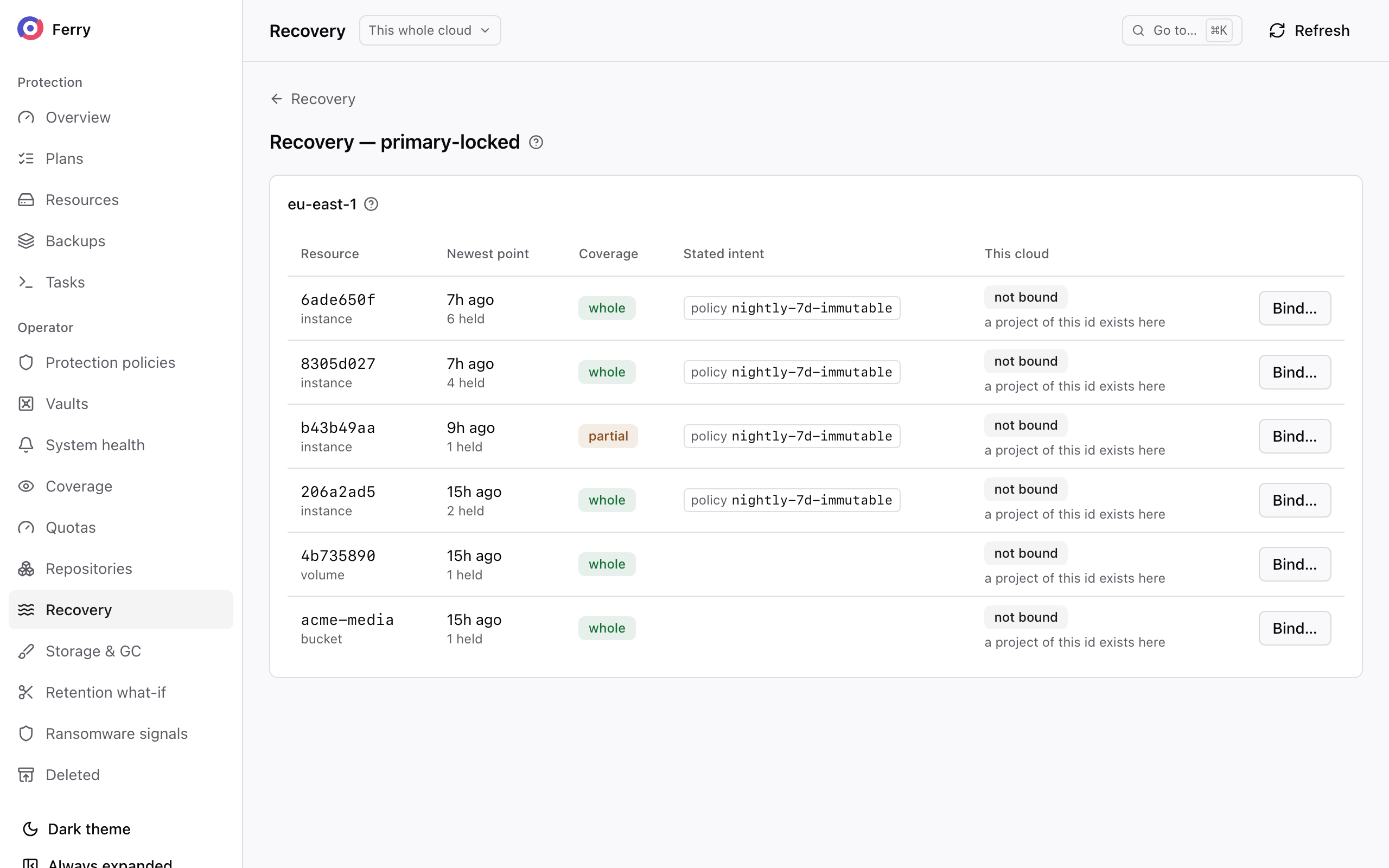
Resolve missing encryption keys and backup adoption errors before attempting recovery. The console identifies affected domains and resources with the error for each.
The same inventory is available as GET /v1/repositories/<repository-id>/inventory with a system-scoped
token.
Set recovery targets in a policy
A policy records the recovery site, tier and targets that projects see in its summary. Configure resource bindings, any required standbys and group registrations in the recovery region before offering those targets to projects.
- Console
- CLI
In the operator section, open Protection policies and edit the policy, or choose New policy. Under Recovery, tick Promise recovery at another site, then choose the Site and the Rung, and set the RPO target and RTO target. Test the failover on a cadence, with Test every, records the required test interval.
ferry policy update \
  --recovery-site <site> \
  --rung warm \
  --rpo-target 1h \
  --rto-target 30m \
  --test-every monthly \
  <policy>
--transport defaults to rbd-mirror for hot recovery and repository for cold and warm recovery.
--clear-recovery removes the recovery targets.
ferry site list and GET /v1/sites list the sites this region knows. A site becomes known when a
repository is registered under its name.
The sentence names the site, the recovery time target when there is one, where the recovery starts from, and the test cadence when there is one:
| Tier | The policy's sentence ends with |
|---|---|
cold | Recoverable at eu-west within 4 hours, restored from the backups held there. |
warm | Recoverable at eu-west within an hour, from a standby kept ready there, tested monthly. |
hot | Recoverable at eu-west within 30 minutes, from a copy mirrored there every few minutes. |
A policy is refused in four cases:
- The recovery site cannot read any repository the policy writes to. That can be its backup repository, its copy repository, or a replica of either. The refusal reads no repository this policy writes to is reachable from that site: add a copy tier there, or register the replica that is. This also applies to hot recovery, because backups contain the server configuration.
- A
coldorwarmrecovery point target is shorter than the policy's cadence. Nothing newer than the last backup exists to recover from. - A
hotrecovery point target is shorter than the mirror snapshot interval, where Ferry takes the mirror snapshots. - The transport does not match the recovery tier.
Recover single resources
A recovery binding assigns a source server or volume to a project in the recovery region. Create bindings before a disaster so that projects can access their recovery backups. Registering a protection group creates its members' bindings automatically. For individual resources, create the bindings yourself.
Once the binding exists, the resource's backups appear in the bound project in region B. This includes the backups written before the binding and every new one. They restore like any other backup there. A standby, where one is kept, is already up to date when the recovery starts.
Bind a resource to a project
Specify the target project when creating a binding. The repository does not define project ownership in the recovery region. If a project with the source project's id exists, the console proposes it for you to confirm. The binding records the user who created it. A cloud management platform can also create bindings through the API.
In the inventory, choose Bind… on a resource, give the Target project, and choose Bind. From the next pass, the resource's backups are adopted into that project. This includes the backups already in the repository.
ferry recovery-binding create \
  --repository <repository> \
  --origin-cloud <region-a-cloud-name> \
  --resource <resource-id> \
  --target-project <project-id>
ferry recovery-binding list shows the bindings. The same commands exist as
openstack backup recovery binding …, and as /v1/recovery-bindings in the API.
A resource can be bound to one project. Restoring it into a second project is a one-off restore by an
operator, with --target-project on openstack backup restore create.
Unbinding stops adopting new backups. To unbind, choose Unbind on the resource in the console,
then End subscription, or run ferry recovery-binding delete <binding-id>. The backups already
adopted stay restorable, and a standby stays where it is.
Keep a standby
A standby is a copy of the resource's disks in the recovery region's Ceph cluster. It is brought up to date each time a new backup is adopted. Recovering from it means creating volumes from images that are already written, so the recovery time no longer depends on the size of the disks.
Name a Standby pool when binding (--standby-pool), in a pool prepared as
Prepare warm recovery describes. You can also name an Image prefix
(--standby-prefix), so one pool can hold the standbys of many resources.
A standby is seeding until its first copy is complete, replaying while it catches up, and
current once it holds the newest backup. ferry standby list shows each one's state, and the project
it belongs to sees it with openstack backup standby list.
ferry standby promote <standby-id>, or openstack backup standby promote, turns a standby into
volumes. The volumes are cloned from the snapshot taken when the last replay finished, so they hold
exactly that backup even while a replay runs. A standby with no such snapshot yet is refused with
standby_has_no_applied_snapshot. The promote creates one volume per disk in the standby's project,
boot disk first. --volume-type and --availability-zone place them. Attach them to a recreated or new
server like any others.
Map flavors and networks
The other region's flavors, networks and security groups rarely exist under the same names here. A recovery profile says how they translate, per region the backups come from. Write it as YAML:
name: from-region-a
origin_cloud: <region-a-cloud-name>
flavor_map:
  m1.large: gp2.4c-8g
network_map:
  prod-net: dr-prod-net
import_keypair: true
ferry recovery-profile create -f from-region-a.yaml
A profile can also map subnets, availability zones, security groups, key pairs and volume types
(subnet_map, az_map, security_group_map, keypair_map, volume_type_map). It can name a floating
IP pool (floating_pool) and recreate missing security groups (recreate_security_groups). It can also
pick the closest flavor by its specification when a flavor is not mapped (flavor_fallback_by_spec). A
protection group's registration names a profile in the same way.
Before a disaster, check the resource's recovery mappings:
ferry recovery-binding dry-run --profile from-region-a <binding-id>
It resolves the binding's newest backup against this region and lists anything the profile does not
map. A restore uses the profile with
openstack backup restore create --mapping-profile from-region-a. It refuses to start while anything is
unresolved, unless you confirm each element with --confirm-unresolved.
Keep a second copy of every backup
A policy can copy each backup to a second repository with its own retention periods. Use storage in a separate failure domain so it remains available if the primary repository fails:
ferry policy update \
  --copy-repository <repository> \
  --copy-keep "daily=7,monthly=12" \
  <policy-id>
The copy is made shortly after each backup completes. Both repositories must hold the same encryption
key for the backups' domain. Until they do, copies wait, and the manager logs which key to export and
import. Storage that replicates itself needs no copy tier. Register the replica with --replica-of, as
above.
Project access to recovery
- Recovery targets. A policy summary names the recovery site, tier and targets.
- Their protection groups. Under Disaster recovery › Protection groups in the console, in every region where disaster recovery is on. At home a project sees the groups it created. In the recovery region it sees the registrations of its groups, with their readiness, tests and runs.
- Recovered backups. A bound resource's backups appear in the target project's Backups like any others, and restore the same way. They cannot be deleted there. They expire in the region that wrote them, and a delete is refused with point belongs to another cloud.
- Standbys. A project lists its standbys and promotes them into volumes.