Organization billing
Billing is switched on and off per organization. An organization with a billing profile attached is billed; an organization without one runs on the platform with billing turned off. Its projects are provisioned and its users create resources as usual, but OSIE records no charges for it, and its users see no prices, bills or credits anywhere in the portal.
Turn billing off for internal teams, for partners you invoice through another system, and for any organization that uses the cloud without being charged by the platform.
The attached billing profile
An organization can own several billing profiles. At most one of them is attached, and the attached profile is the payer for every project in the organization. Projects do not choose a billing profile of their own.
Profiles the organization owns but has not attached keep their bills, credits and payment history. You can attach any of them again later, which also gives the organization's users access to that history again.
Effects of turning billing off
In the customer portal, for every user of the organization:
- The Financial menu is removed: funds, bills and transactions, payment methods, promotional credits and savings plans.
- Prices are removed from every create form and every resource page. The project dashboard shows the project's resources and quotas in place of its costs.
- The organization's settings no longer show a billing profile, and users cannot create one. Only an administrator turns billing on.
On the platform:
- No charges are recorded for the organization's projects.
- The period without billing is never charged. When billing is turned on, charges start from that moment.
- Bills the detached profile had already produced are still issued and collected. Automatic suspension and payment reminders stop for that profile, so an outstanding balance stays owed on it without being enforced.
New organizations
An organization you create from the admin dashboard starts with billing off. Set Billing to Enabled in the Add Organization form to create a billing profile for its owner and attach it at the same time; this requires choosing an owner.
Organizations that customers create for themselves in the portal always get a billing profile attached.
Turn billing on
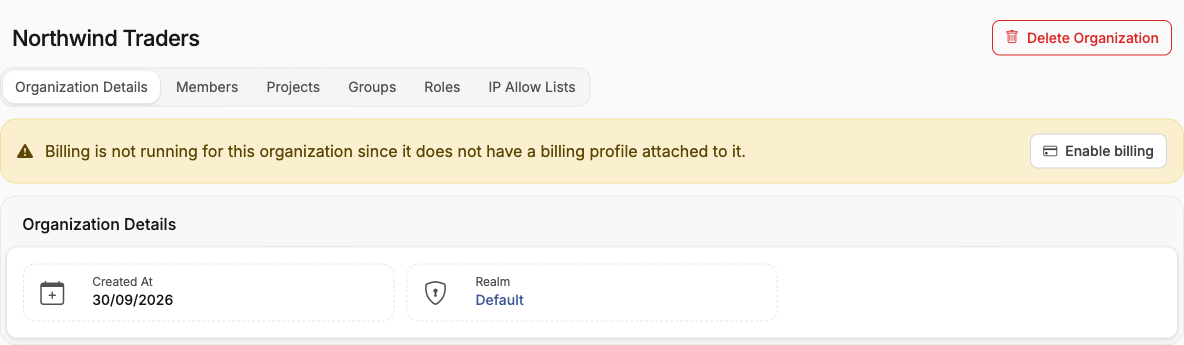
Open the organization. Its Details tab shows that billing is not running, with an Enable billing button.
The dialog lists every billing profile the organization owns, with its currency, balance and status; choose the one to bill on.
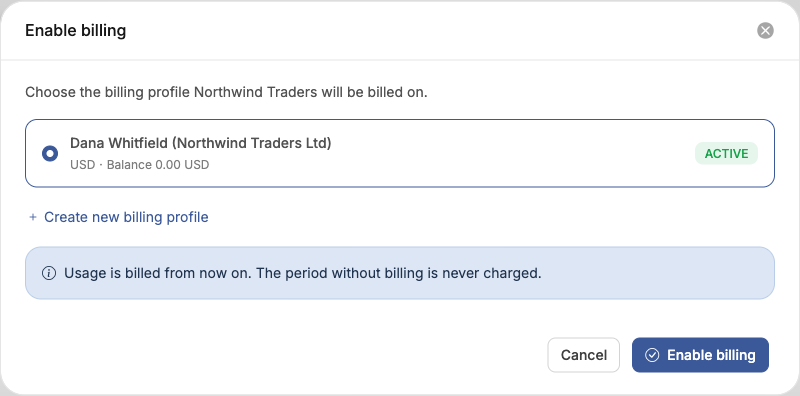
If the organization owns no billing profile yet, choose Create new billing profile. The new profile is not attached automatically — return to the organization and choose Enable billing once it exists.
The organization's projects follow the status of the profile you attach:
| Profile status | Effect on the organization's projects |
|---|---|
| Active | None. Charges start from now. |
| New | Suspended until the profile is activated. |
| Suspended | Suspended until the profile is unsuspended. |
Change the billing profile
With billing on, Change billing profile attaches a different profile the organization owns. Usage up to now stays billed on the current profile, and usage from now on is billed on the selected one. The table above applies to the profile you switch to.
Turn billing off
Disable billing detaches the organization's profile. Nothing is deleted: the profile keeps its owner, bills, credits and payment history, and stays available to attach again.
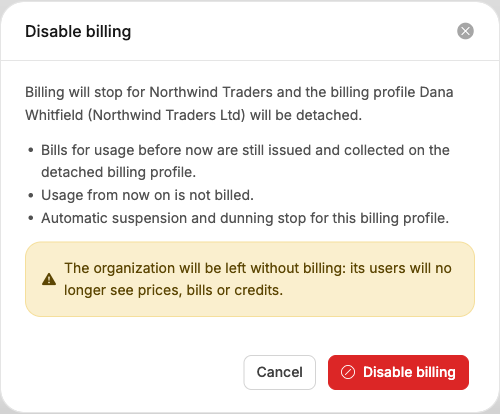
If the detached profile was New or Suspended, the organization's suspended projects are resumed.
Resuming applies to every suspended project in the organization, including a project you suspended for another reason. Review the organization's projects before you turn billing off on a profile that is not active.
Admin API
The same operations are available on the admin API, under /admin_api/v1/organizations/{id}:
| Request | Effect |
|---|---|
PUT /billing_profile with billing_profile_id | Turns billing on, or changes the profile. The profile must belong to the organization or to no organization yet. |
DELETE /billing_profile | Turns billing off. |
Organizations report the state in billing_enabled. Updating an organization without
billing_profile_id leaves its billing unchanged, so turning billing off always goes through the
DELETE request. An organization created without billing_profile_id starts with billing off.