OpenStack domain access
The OpenStack Domains tab of a realm defines which OpenStack domains the realm's users are provisioned into, and how they authenticate to OpenStack. This is what extends customer segregation from OSIE into Keystone: map each customer realm to its own OpenStack domain, and their users, projects, and resources stay separated at the OpenStack level too.
For what this mapping produces in Keystone, and how access to it is scoped, see Identity and access model.

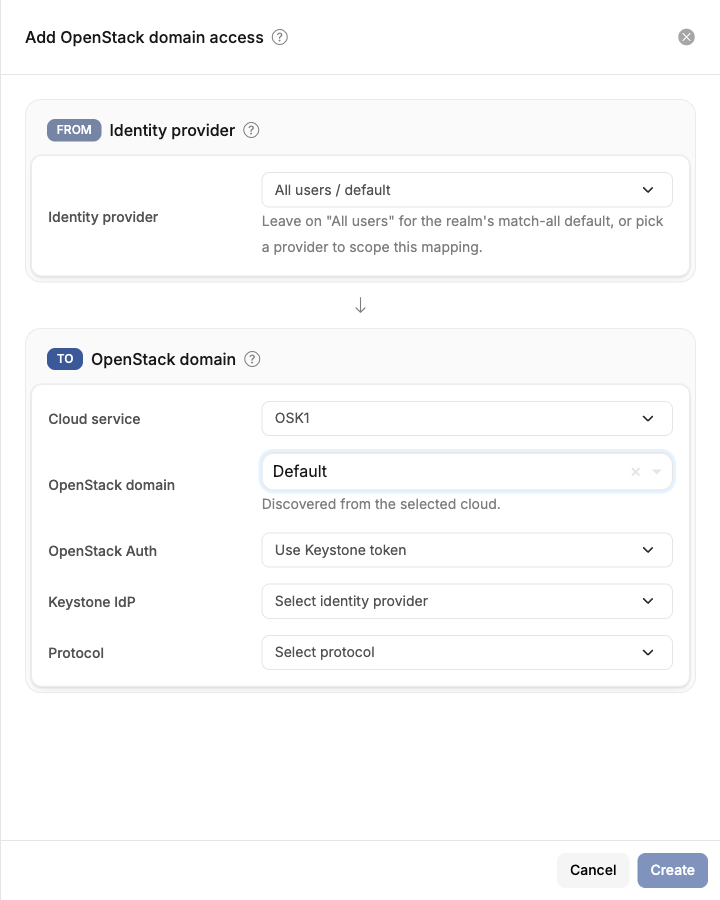
Each entry maps users from an identity provider (or all users of the realm) to an OpenStack domain on one cloud:
- Identity provider — leave on All users / default for the realm's match-all mapping, or pick a specific provider to scope the mapping to users who sign in through it. A provider-specific mapping takes precedence over the match-all one.
- Cloud service — the OpenStack cloud the mapping applies to. A realm can map to different domains on different clouds.
- OpenStack domain — the target domain, discovered from the selected cloud. The domain must already exist in OpenStack.
- OpenStack Auth — how users of this mapping authenticate to OpenStack (see below).
Auto-provision OSIE user in Keystone
OSIE creates a Keystone user for each person inside the mapped domain, and manages its password automatically. Users never interact with Keystone directly; OSIE obtains and scopes their tokens for them.
This is the default strategy. It requires no Keystone configuration and works for any OpenStack deployment.
Use Keystone token
Users authenticate to Keystone themselves and OSIE works with the Keystone tokens they obtain — OSIE stores no OpenStack credentials for them. Pick this strategy when the users already exist in Keystone or when Keystone federates to an identity provider:
- Combined with a Keystone credentials identity provider, users sign in to OSIE with their Keystone username and password (for example against an LDAP-backed domain), and that same sign-in produces their OpenStack token.
- Combined with a Keystone IdP and Protocol (discovered from the cloud's federation catalog), users go through Keystone's single sign-on when they first access the cloud, and OSIE keeps the resulting session. The Keystone-side setup for this is described in Keystone federation.
OSIE's own roles on the mapped domain
OSIE synchronizes and deletes a customer's projects as the cloud's administrator user. Keystone lets that user into a project only when it holds a role there. Without one, the projects in the domain cannot be synchronized or deleted.
On a cloud configured with cloud-wide administrator credentials, saving a mapping gives the administrator user the cloud's project roles on the mapped domain. These are the roles set on the cloud's Provisioning tab. They are inherited, so they cover every project in the domain. When OpenStack refuses the grant, the mapping shows the reason. Grant the roles in OpenStack and save the mapping again. Cloud diagnostics also check these roles.
Valid combinations
The identity provider a mapping is scoped to determines which strategies it accepts. These are the five combinations OSIE allows; anything else is rejected when the mapping is saved.
| Mapping scope | OpenStack Auth | Keystone IdP & Protocol | What users get |
|---|---|---|---|
| All users / default | Auto-provision | left blank | Every user of the realm gets an OSIE-managed Keystone user in this domain |
| All users / default | Use Keystone token | required | Any sign-in in the realm rides a Keystone single sign-on token, whichever provider authenticated it |
| An OIDC identity provider | Auto-provision | left blank | Users of that provider get an OSIE-managed Keystone user |
| An OIDC identity provider | Use Keystone token | required | Users of that provider go through Keystone single sign-on |
| A Keystone credentials provider | Use Keystone token (only option) | left blank | The token is captured when the user signs in with their Keystone username and password |
Reading the rules behind the table:
- Auto-provision never uses the federation fields. There is no Keystone-side setup, so there is nothing to point at.
- A Keystone credentials provider is always Keystone token. The sign-in itself produces the token, so creating a second Keystone user for the same person would be wrong, and no single sign-on bounce is involved.
- A match-all mapping cannot use the Keystone credentials flavour. That one depends on a specific provider having captured the token at login, so it must be scoped to that provider.
- Shared clouds accept auto-provision only. The Keystone strategies need a dedicated cloud.
A provider-scoped mapping takes precedence over the realm's match-all mapping, so the two are normally combined: a match-all auto-provision entry for everyone, plus one scoped entry for the provider whose users authenticate to OpenStack themselves.
Changing an existing mapping from auto-provision to Keystone federation changes which Keystone user each person is. Resources bound to the previous Keystone users — SSH key pairs, application credentials — do not carry over.
Invitations
Project invitations can only provision OpenStack access for users covered by an auto-provision mapping. Users who authenticate through Keystone single sign-on gain project access when they next sign in to the cloud themselves.