Database Lifecycle Management on OSIE: The Severalnines/CCX Integration
Manual database management for OpenStack deployments can become a headache at scale. Someone has to provision servers, configure replication, tune memory, and build backup and restore.
Enterprise teams migrating from VMware used Data Services Manager for database as a service (DBaaS), and would expect an OpenStack equivalent.
Managed Service Providers (MSPs) running multi-tenant OpenStack deployments at scale need to offer database lifecycle management to tenants, without repeating manual setup for every deployment.
With DBaaS on OpenStack, migrators, MSPs, and Cloud Service Providers (CSPs) don’t have to build a custom database management layer.
This article looks at OpenStack’s DBaaS options, native and third-party.
It also covers how the OSIE dashboard brings DBaaS into the same place as metered compute, networking, storage, and backup and restore.
OSIE is a dashboard and billing platform for OpenStack, giving operators a self-service portal, real-time billing, and enterprise features built in.
No need to switch between dashboards for DB lifecycle management.
Let’s begin by exploring OpenStack’s native DBaaS service, Trove.
Trove: DBaaS on Native OpenStack
Trove is OpenStack’s DBaaS component, automating provisioning, configuration, patching, backups, restores, and monitoring.
It runs within a Nova instance and depends on other Openstack components like Neutron (Networking), Cinder (Block Storage), Glance (Images), and Keystone (Identity). It interacts with these services via their APIs.
Trove is an active OpenStack project. The upcoming release, 25.0.0-63, OpenStack’s 2026.2 “Hibiscus”, adds updates like PostgreSQL 18 support, removing Keystone credentials from guest agents for better security, and introduces SSL/TLS certificate management through Barbican (Key Management).
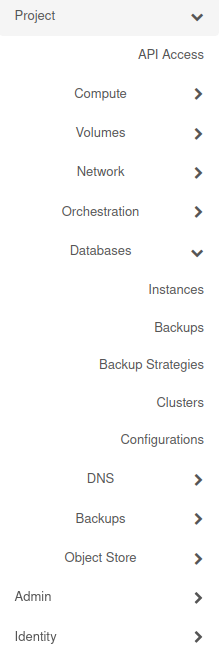
Trove is available as a plugin, trove-dashboard which you can install on your Horizon dashboard. You should find it under Databases
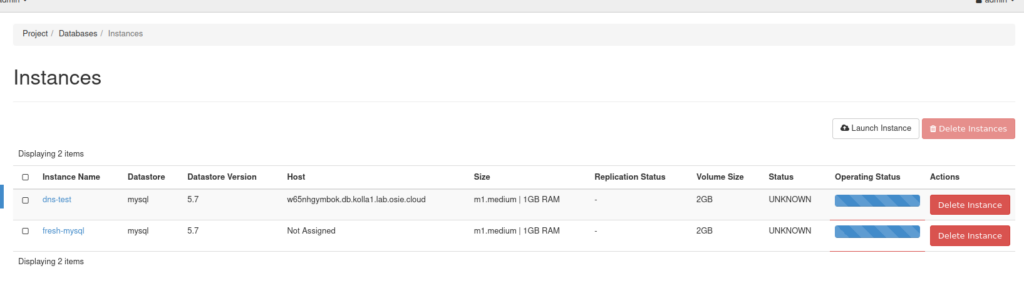
Once you have some instances, you should see them under Project > Databases > Instances
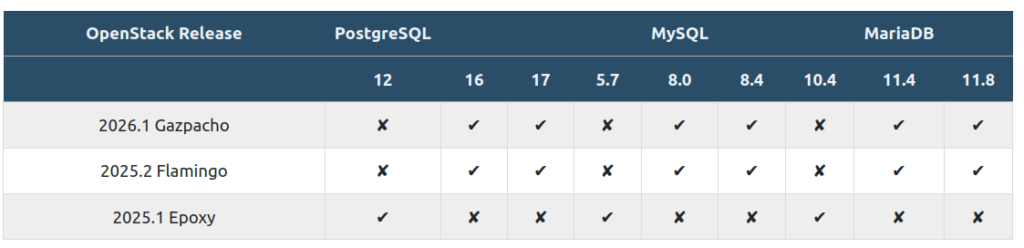
Trove is built for both relational and non-relational database engines. The latest supported datastores are PostgreSQL, MySQL, and MariaDB.
It is also versatile. When launching a DB instance, you can:
- set a location policy for compute placement,
- restore from an existing backup or replicate from another instance,
- and apply a configuration group to batch-set parameters across databases.
A location policy controls whether the instance’s compute placement is tied to other instances in the same group. Affinity places the instance on the same physical host as related instances. Anti-affinity forces it onto a different host, which matters for high availability when running a database with replicas.
A configuration group lets you set database engine parameters, in bulk, on one or more databases, useful for keeping settings consistent across instances rather than tuning each one individually.
Why Third-Party Alternatives
Trove sits on top of several other OpenStack services. Errors can, therefore, originate from any of them, not just Trove itself, making failures hard to debug.
To work with different datastores, an admin has to register a Glance image and explicitly create the datastore and its version on the OpenStack CLI each engine/version combination before tenants can use it.
Trove’s setup is intricate. Getting even one instance working reliably can mean hand-editing configuration files across the management and tenant-facing networks, registering per-engine images correctly, and troubleshooting guest agent connectivity.
For MSPs running multiple OpenStack deployments at scale, the setup might require custom scripts as it needs to be done per deployment.
Third-party DBaaS options make setup and lifecycle management easier, and easy to replicate across deployments.
As Severalnines’ CTO Johan Andersson noted in a webinar, creating a database is the easy part. The majority of the actual engineering work goes into day two lifecycle management, scaling, failover, upgrades, and backups.
Let’s look at one of the third-party DBaaS OpenStack options, Severalnines.
Severalnines
Severalnines is a DBaaS provider. Its product, CCX, lets you run sovereign DBaaS solutions.
Severalnines supports multiple infrastructures and datastores. It runs on a Kubernetes-native control plane, with the databases themselves running on VMs in the data plane, accessible through a User Interface (UI).
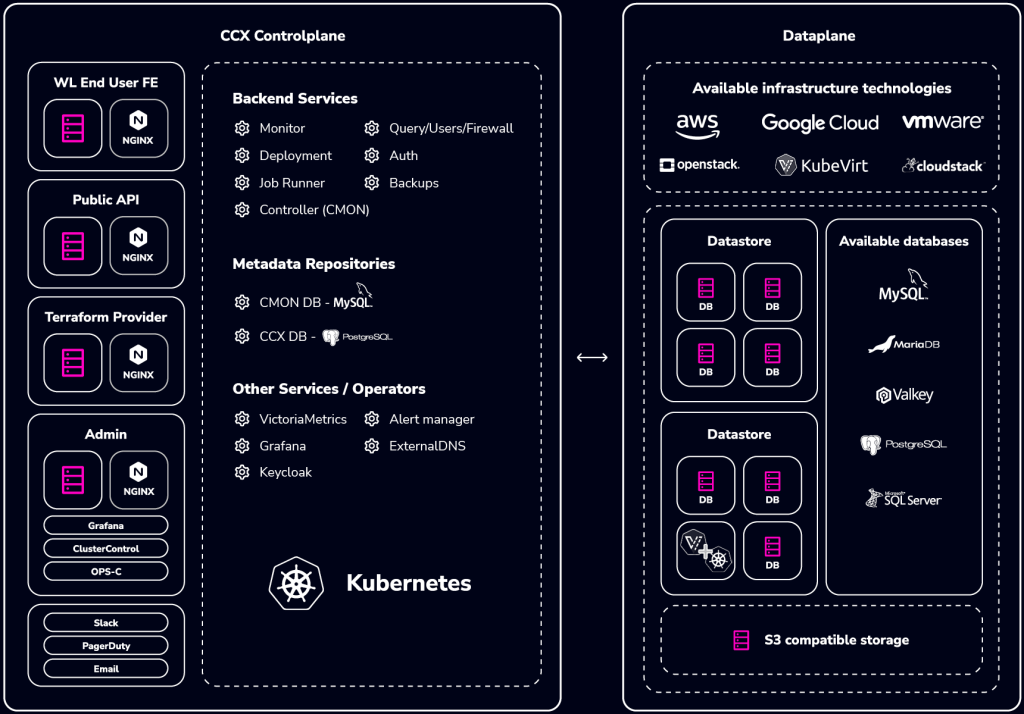
CCX supports AWS, OpenStack, CloudStack, Google Cloud, VMware, and KubeVirt, with PostgreSQL, MariaDB, MySQL, SQL Server, and Valkey as available datastores.
With CCX, you can run the entire database lifecycle: provisioning, scaling, security, access management, monitoring, backups, disaster recovery and failover.
Encryption at rest uses Linux Unified Key Setup, LUKS, and encryption in transit uses TLS, both enforceable per data store. Backups are written to S3-compatible storage.
CCX offers two integration paths for an operator to expose it to end users: using CCX’s own interface directly (including white-labeled), or building a custom interface against its API.
How Severalnines Integrates with OSIE, Under the Hood
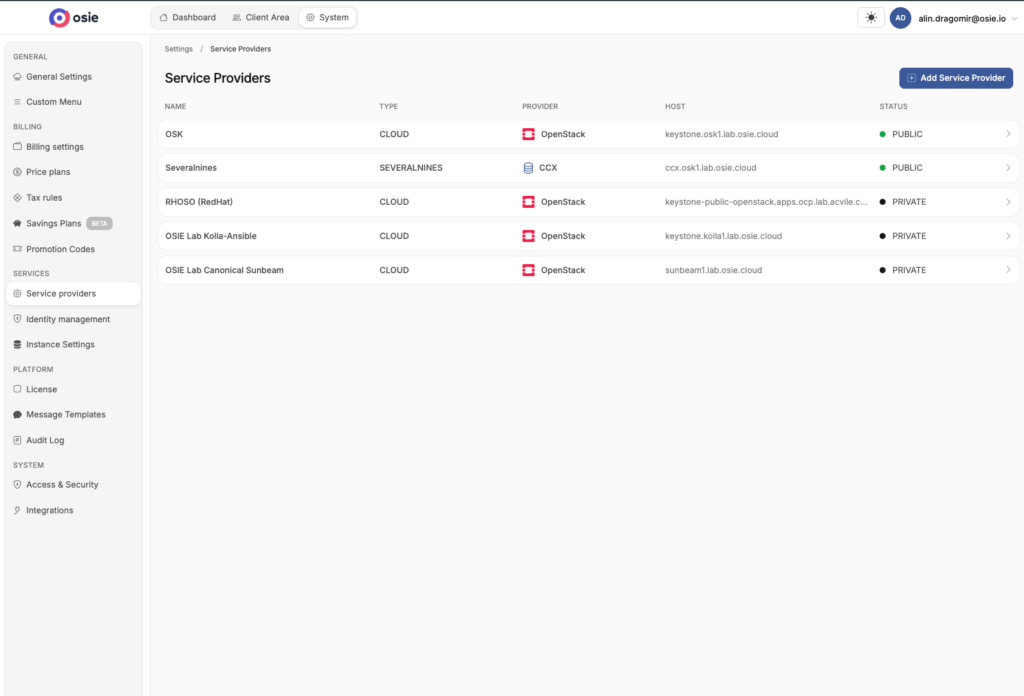
Severalnines is registered as its own distinct service provider type, “CCX” with a dedicated host. OSIE talks to Severalnines as a first-class, separately registered integration.
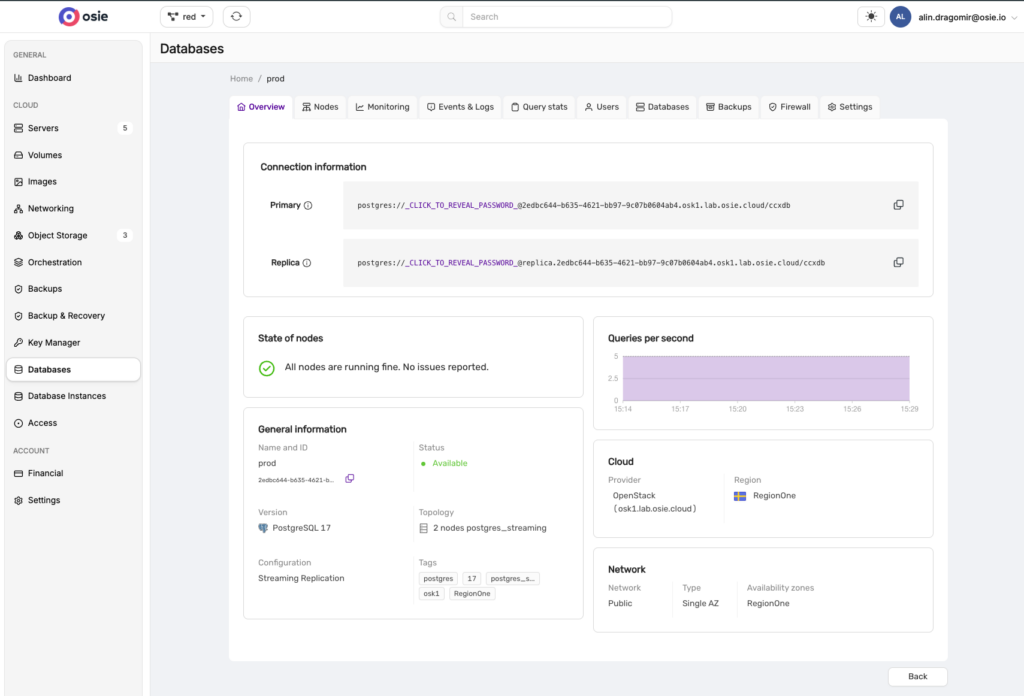
Tenants see their datastores directly in OSIE, with status, engine/version, node count, cloud provider, and a live queries-per-second chart per datastore. They don’t need a separate Severalnines dashboard.
Once inside a datastore, OSIE shows full connection info (primary and replica connection strings on OSIE’s own domain), node state, topology, and live metrics.
In the screenshot, the prod datastore’s network settings show a single availability zone, so its replica protects against a node failure, not a zone-wide outage.
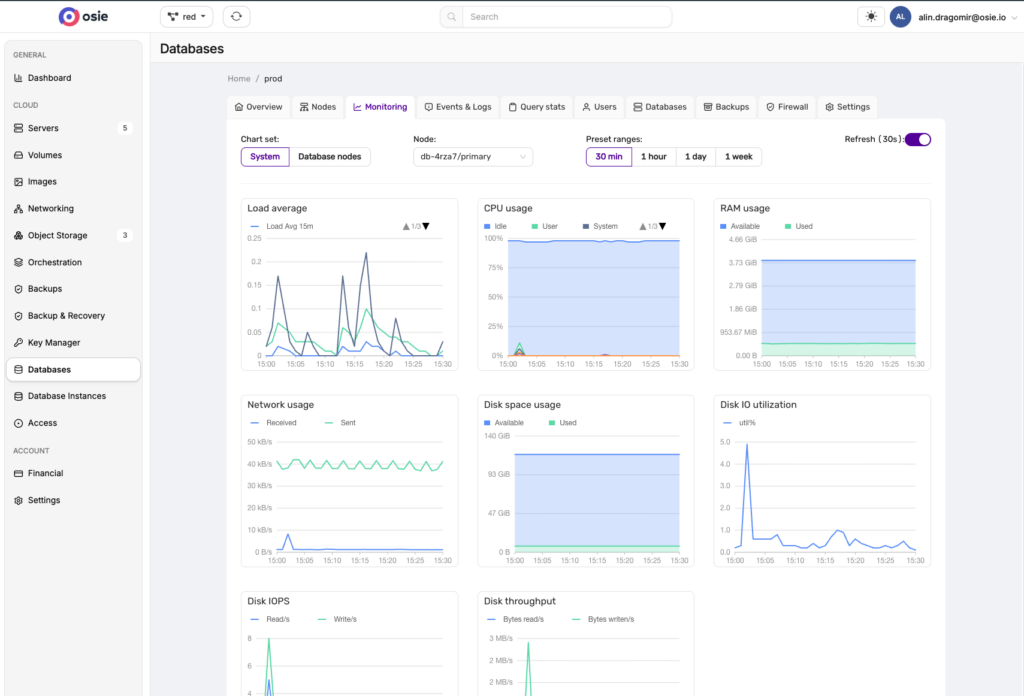
You also have a dedicated Monitoring tab that breaks resource usage down further: load average, CPU, RAM, network, disk space, and disk I/O, each as its own chart with adjustable time ranges.
OSIE-Severalnines Integration Features
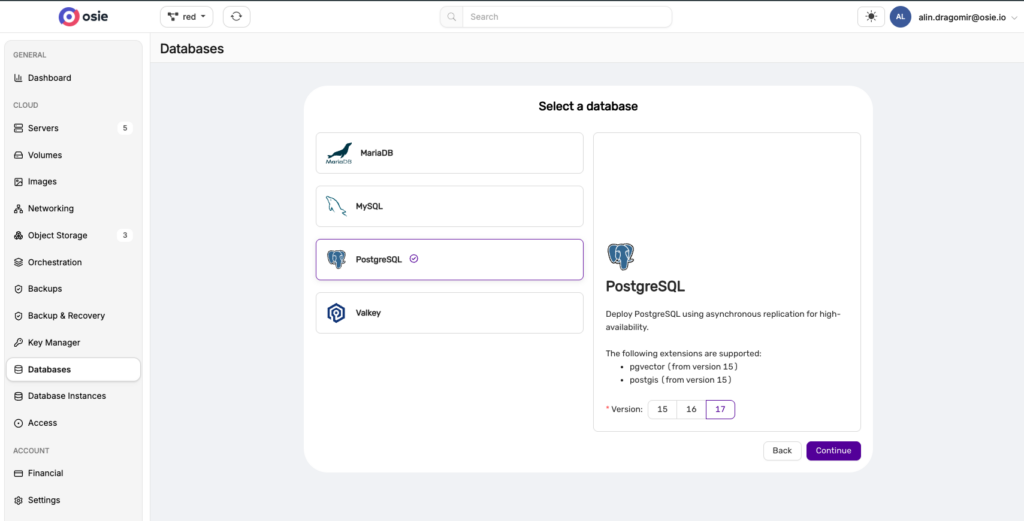
- Multiple supported datastores. Choose from MariaDB, MySQL, PostgreSQL, or Valkey when creating a datastore, with version-specific detail, like supported PostgreSQL extensions (pgvector, PostGIS), shown per version
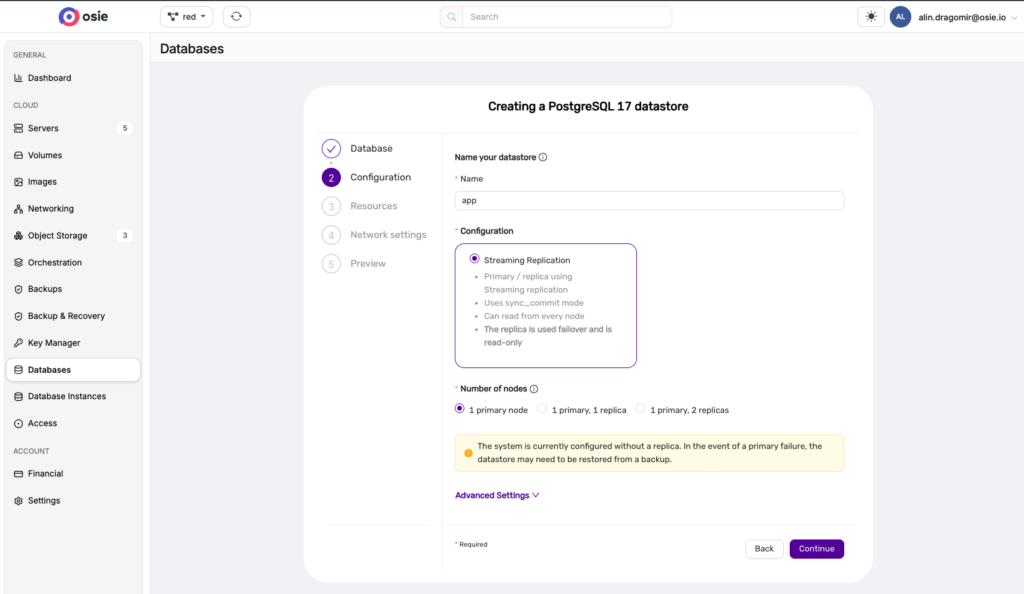
- Built-in replication. Choose up to two node replicas, so a replica can take over if the primary fails. Without a replica, recovery means restoring from a backup instead.
- Secure connection details. While primary and replica connection strings are shown directly on the OSIE dashboard, the password stays masked until you click to reveal it.
- Detailed monitoring. CPU, RAM, disk, network, and query metrics, visible per datastore.
- Independent datastores. Each one is named, tracked, and monitored on its own, useful for separating environments like dev, staging, and prod.
Conclusion
In this article, we explored the world of DBaaS in OpenStack. Trove, OpenStack’s native DBaaS, does help with database management, but it can be difficult to set up, debug, and run across multiple deployments at scale.
OSIE integrates with Severalnines to bring scalable DBaaS to OpenStack, with support for multiple database engines, MariaDB, MySQL, PostgreSQL, and Valkey.
OSIE provides an enterprise-ready OpenStack dashboard for running a complete cloud business: metered compute, storage, networking, backup and restore, access management, and now DBaaS, all on one dashboard.
Try OSIE free today: Osie Free Edition