Chargeback on OpenStack: What CloudKitty Gives You, and What It Doesn’t
Moving from VMware to OpenStack changes more than the hypervisor. Showback and chargeback are part of VMware Cloud Foundation (VCF). On OpenStack, you put them together yourself.
Ceilometer measures usage, but billing and pricing have been out of its scope from the start. CloudKitty is the OpenStack project built to fill that gap. It is a rating engine. It reads usage, puts the prices you define on it, and stores the result.
In this post, we run CloudKitty in a DevStack test environment . We go from a dashboard that shows 0.00 to a priced breakdown for each hour.
We also show where CloudKitty stops. It does not generate invoices, and leaves taxes and currency conversion to billing software. A billing platform such as OSIE issues invoices, applies tax, and collects payment.
We start with why OpenStack doesn’t ship a bill.
Why OpenStack Doesn’t Ship a Bill
A bill rests on business decisions: what you charge for, how much, in which currency, and with which taxes. Most billing operations are business specific, so OpenStack leaves them to the operator.
What OpenStack gives you is the usage and, with CloudKitty, a price on it. Ceilometer measures usage, Gnocchi, a time series database, stores it, and CloudKitty rates it.
CloudKitty is a generic solution for the chargeback and rating of a cloud. It reads usage from Gnocchi or Prometheus and can run in standalone mode, outside OpenStack.
Rating is where OpenStack stops. Next, we look at how CloudKitty does it.
How CloudKitty Works
Ceilometer measures usage and Gnocchi stores it. CloudKitty then takes over: it fetches the scopes to rate, collects usage, passes it through the enabled rating modules, and stores the rated result.
- Ceilometer measures. It collects and normalises the data OpenStack services produce.
- Gnocchi stores. It keeps that data as time series.
- The fetcher picks the scopes. A scope is usually a project, and it is what CloudKitty rates and reports on.
- The collector reads the usage. It reads each scope’s usage for every metric defined in metrics.yml.
- Rating modules price it. The enabled modules apply their rules to the collected usage, highest priority first. In this article, that module is hashmap.
- The storage backend keeps the ledger. The rated data is stored, and the API returns it grouped by scope or metric type
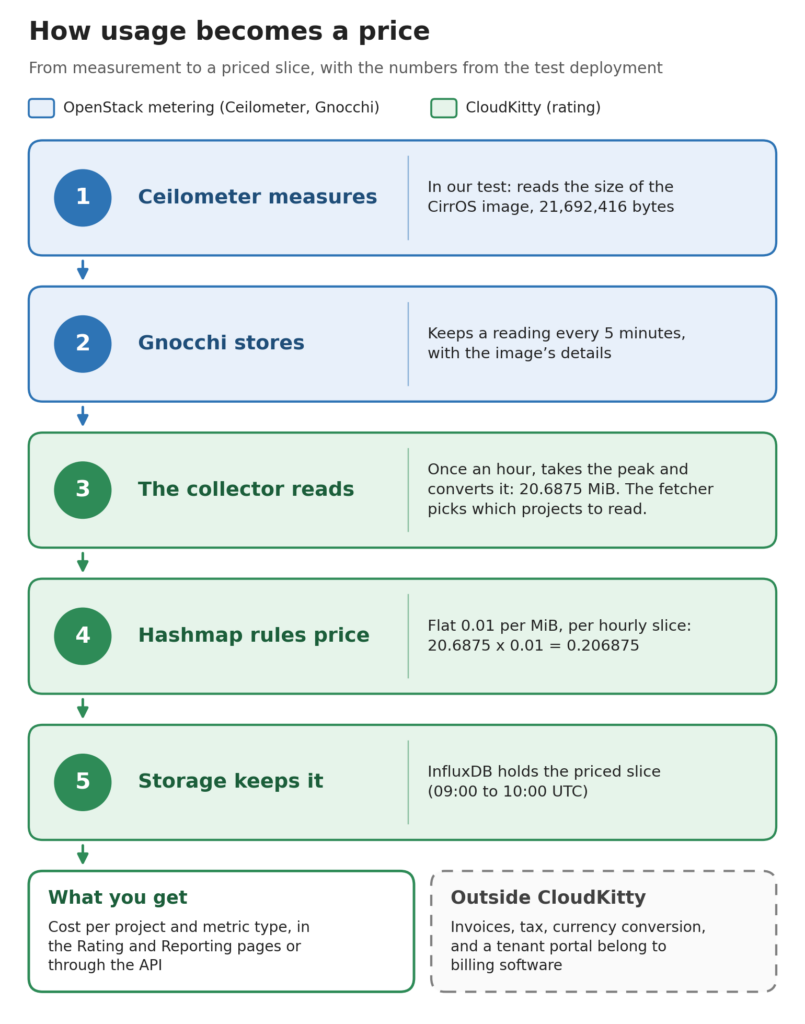
A hashmap rule ties a price to a service, which is a metric CloudKitty collects. A flat mapping adds a fixed amount per unit, and a rate mapping multiplies the total.
A price can also depend on a field, such as the volume type or flavor. Your own prices set the unit: CloudKitty has no currency conversion.
Two processes do the work. cloudkitty-processor handles fetching, collecting, rating and storing, and cloudkitty-api serves the results.
Now let’s see it in our test environment.
Our Test Setup
We tested CloudKitty on DevStack, a development environment for OpenStack, running in a virtual machine.
The deployment ran the 2026.2 release. It had the core OpenStack services for compute, networking, images, and block storage. It also had Ceilometer, Gnocchi, and CloudKitty.
The environment had no workloads. It had no instances, so only two things could be measured: the CirrOS image that DevStack uploads during setup, and a 1 GB volume we created. We set a price on each and watched CloudKitty rate them.
The deployment used these settings:
- Collector: Gnocchi
- Fetcher: Gnocchi
- Storage: InfluxDB
- Rating period: one hour, the default
- Metrics: seven, defined in metrics.yml
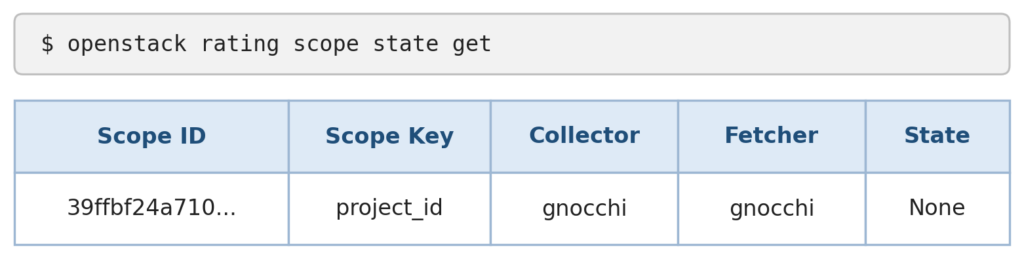
The fetcher finds which projects to rate, and the collector reads their usage. The scope output from our test shows both set to Gnocchi. Your environment may use different settings.
Our metrics.yml defined seven metrics:
- cpu,
- image.size,
- volume.size,
- network.incoming.bytes.rate,
- network.outgoing.bytes.rate, ip.floating,
- radosgw.objects.size.
Only image.size and volume.size had data in our environment. The processor logged a warning for the other five and skipped them each cycle. That is normal when nothing is running.
Hands-On: From 0.00 to Priced Usage
Step 1: The starting point
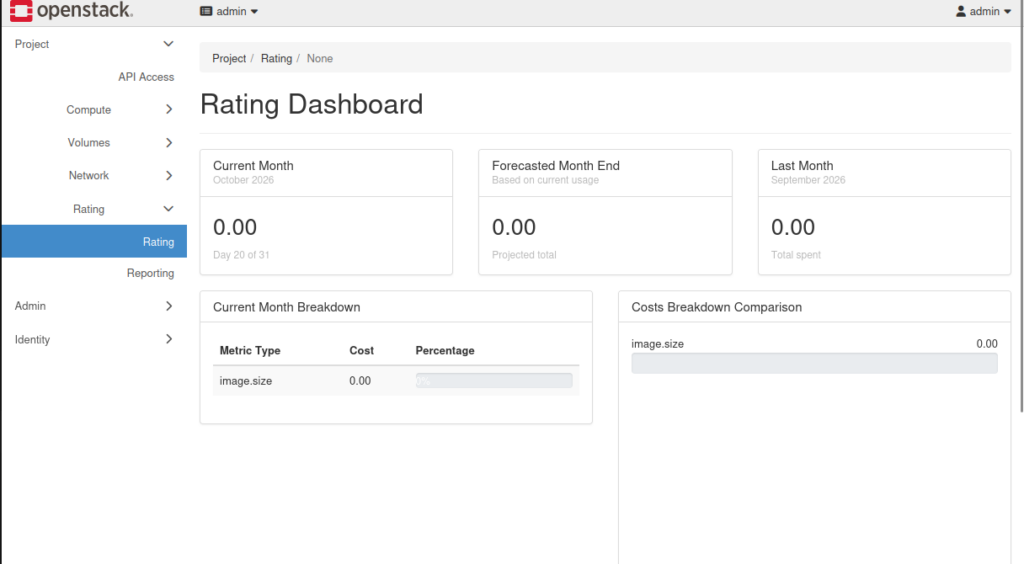
- Right after install, the Rating page has nothing to show.
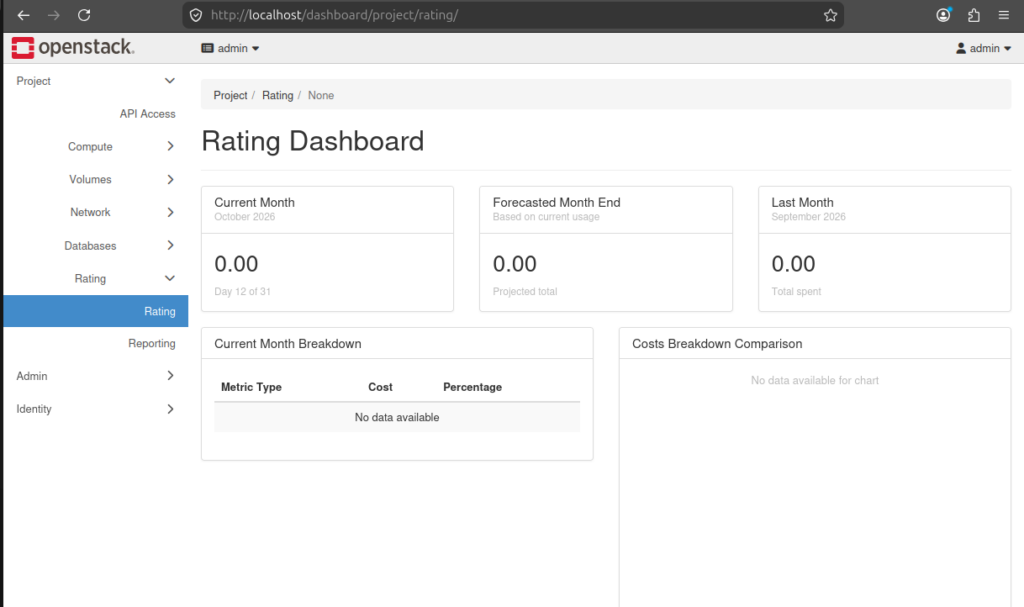
- Once collection starts, image.size appears in the breakdown at 0.00. CloudKitty collects and stores any metric, but a metric with no matching service is stored at a price of zero.
Step 2: What is being rated
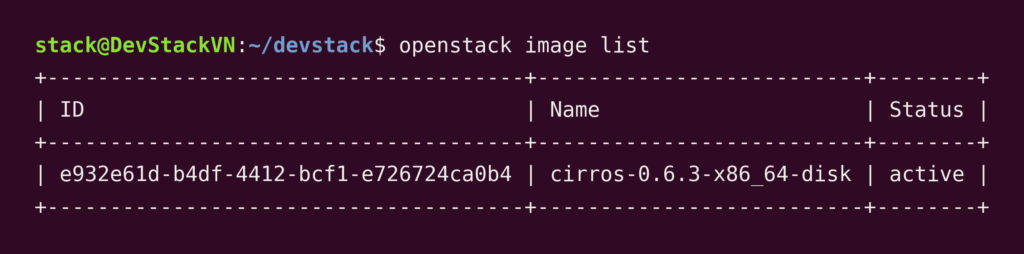
- On a fresh DevStack, the only measurable resource is the
CirrOS imageuploaded during setup. We will add a volume later. The image ID in CloudKitty’s rated data is the oneopenstack image listshows.
Step 3: Enable the hashmap module
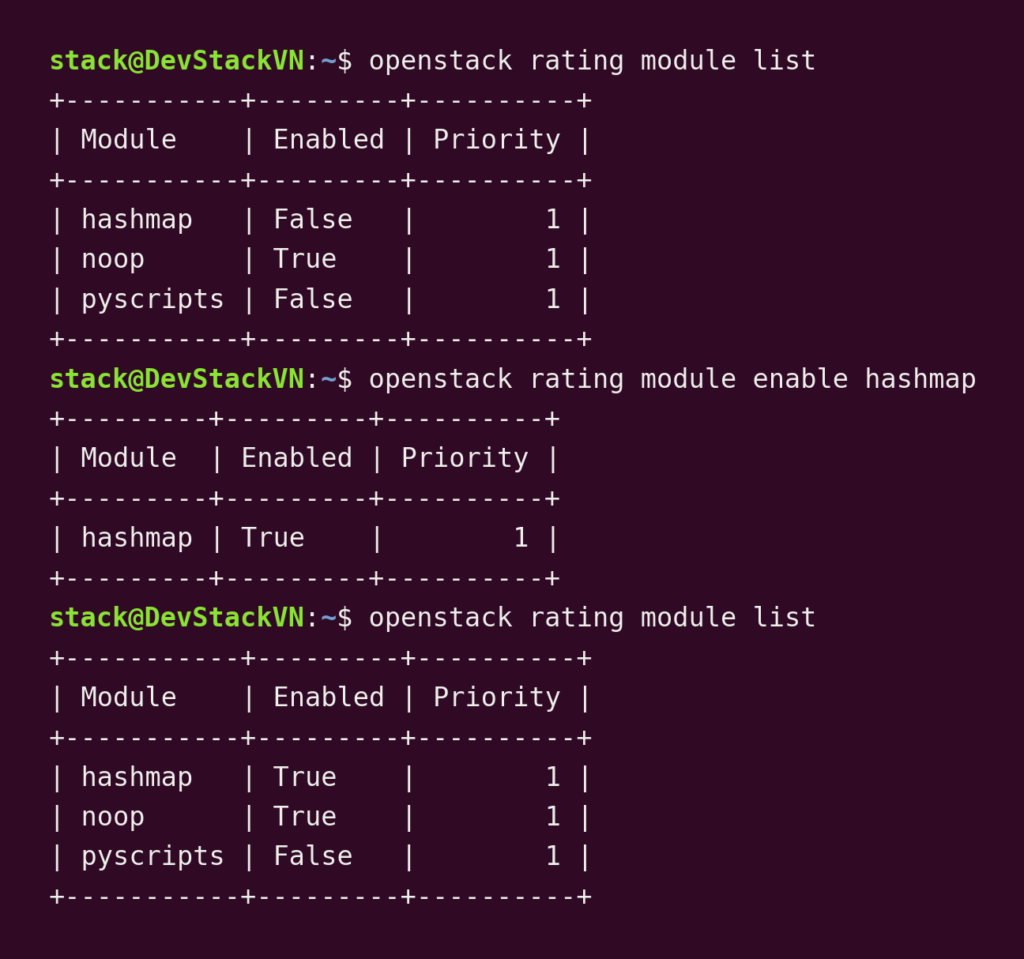
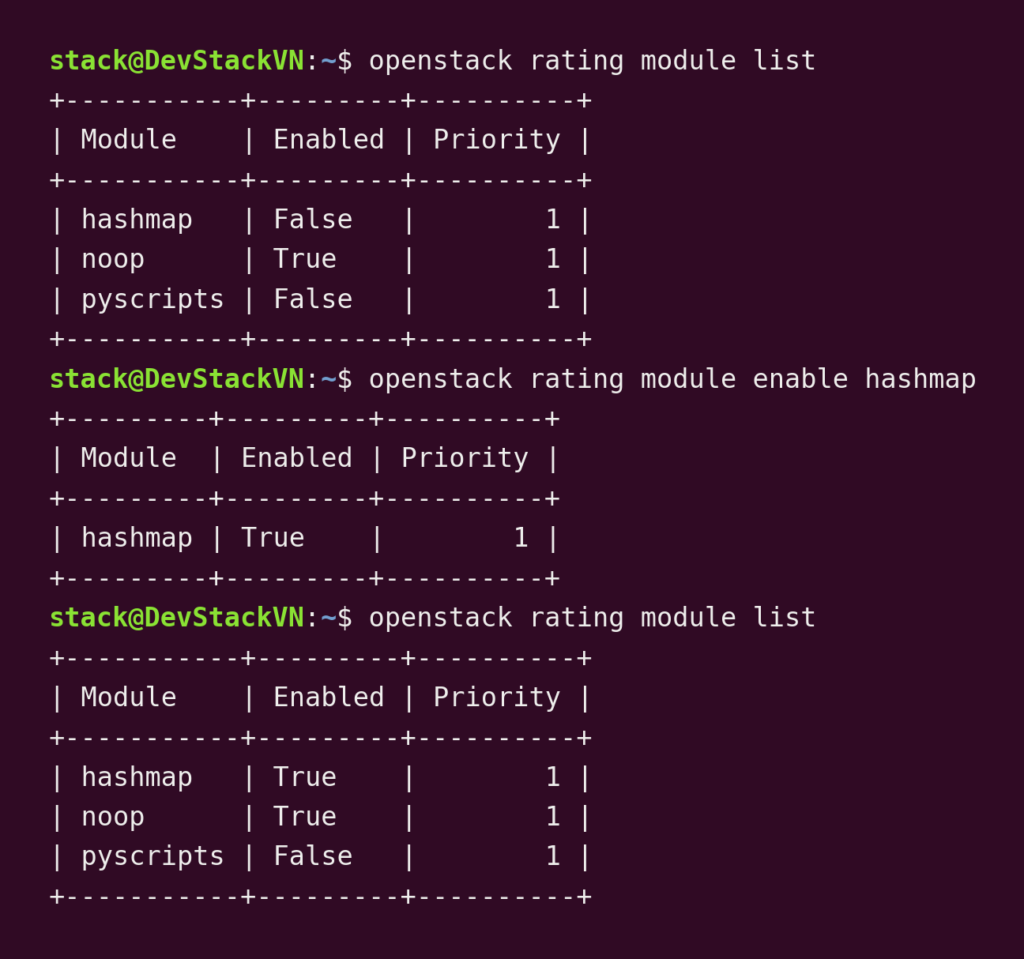
- Hashmap is disabled by default, so even a correct rule would price nothing. Enable it by running
openstack rating module enable hashmap
Step 4: Read metrics.yml
- CloudKitty keeps the metrics it collects in
metrics.yml, by default at /etc/cloudkitty/metrics.yml. A service must match a metric in this file, so open it first. To read the image.size entry run:
grep -A 13 'image.size' /etc/cloudkitty/metrics.yml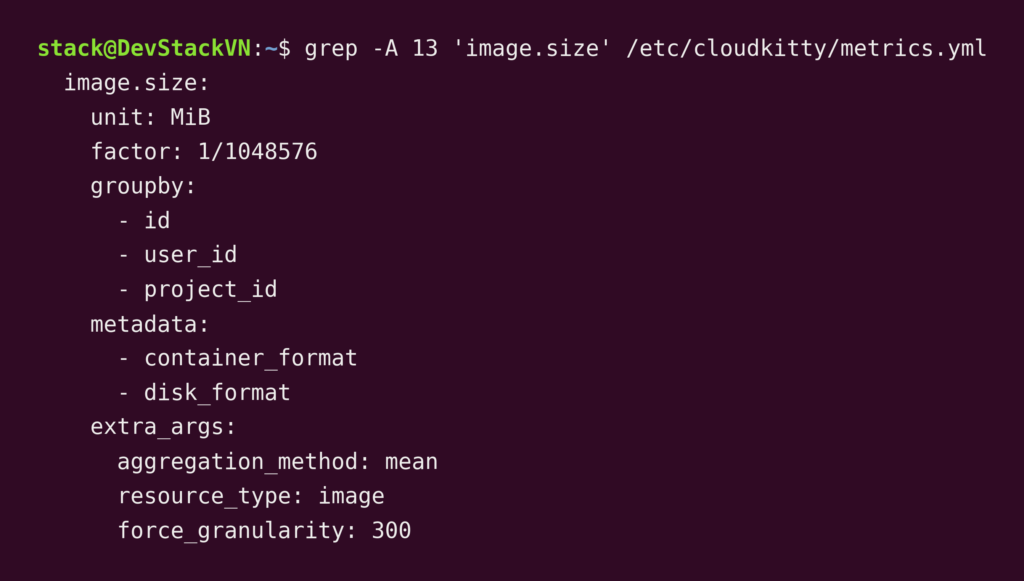
image.size entry in CloudKitty’s metrics.yml in our test: unit MiB, factor 1/1048576Each field in the entry does a different job:
- unit is a label for people. It has no effect on collection, conversion, or rating.
- factor does the conversion. 21,692,416 bytes multiplied by 1/1048576 gives 20.6875 MiB.
- groupby and metadata list the attributes CloudKitty carries with each reading.
- extra_args holds the Gnocchi settings for this metric.
Step 5: Create the service
A service tells CloudKitty that a collected metric is billable. It carries no price yet. The service you create has to match a metric defined in metrics.yml.
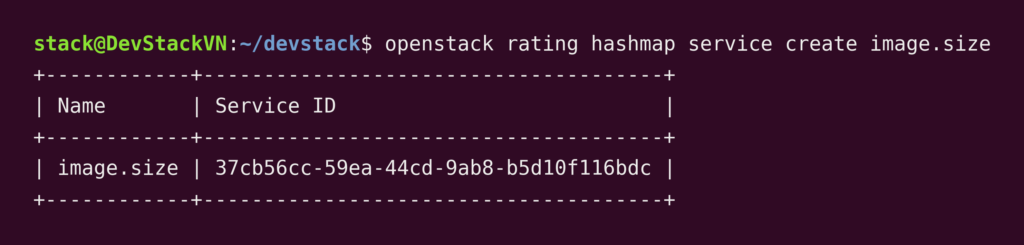
image.size serviceStep 6: Add the mapping (the price)
A flat mapping sets one fixed price: 0.01 for every MiB, every hour. No field or group is attached, so nothing is charged twice. The mapping starts at 08:04:04 and has no end date.

Step 7: Wait for the next full hour
CloudKitty prices usage one period at a time, and the default period is one hour.
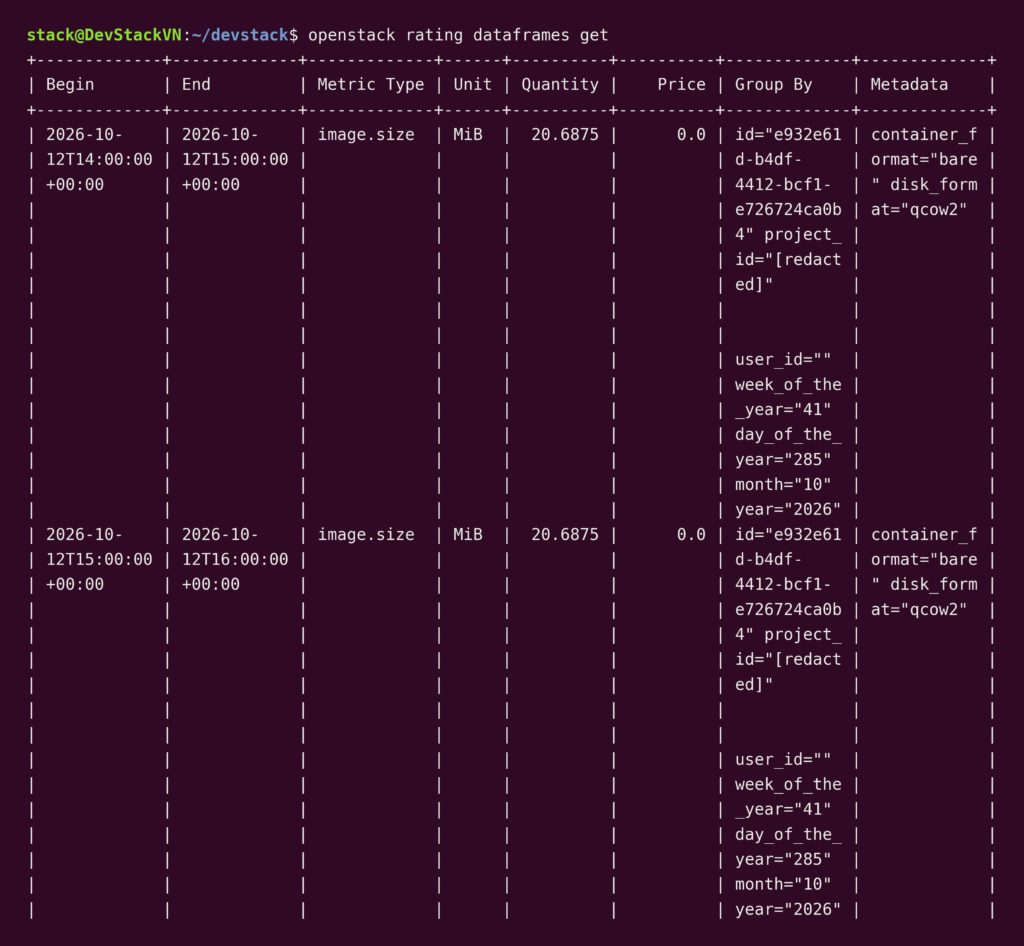
In our test, the 08:00–09:00 hour contains the mapping’s start, and it stayed at 0.0. The first priced hour is 09:00–10:00.
The arithmetic for that hour:
- Gnocchi stores the image size as 21,692,416 bytes.
- The factor turns that into 20.6875 MiB.
- 20.6875 MiB × 0.01 = 0.206875 for the hour.
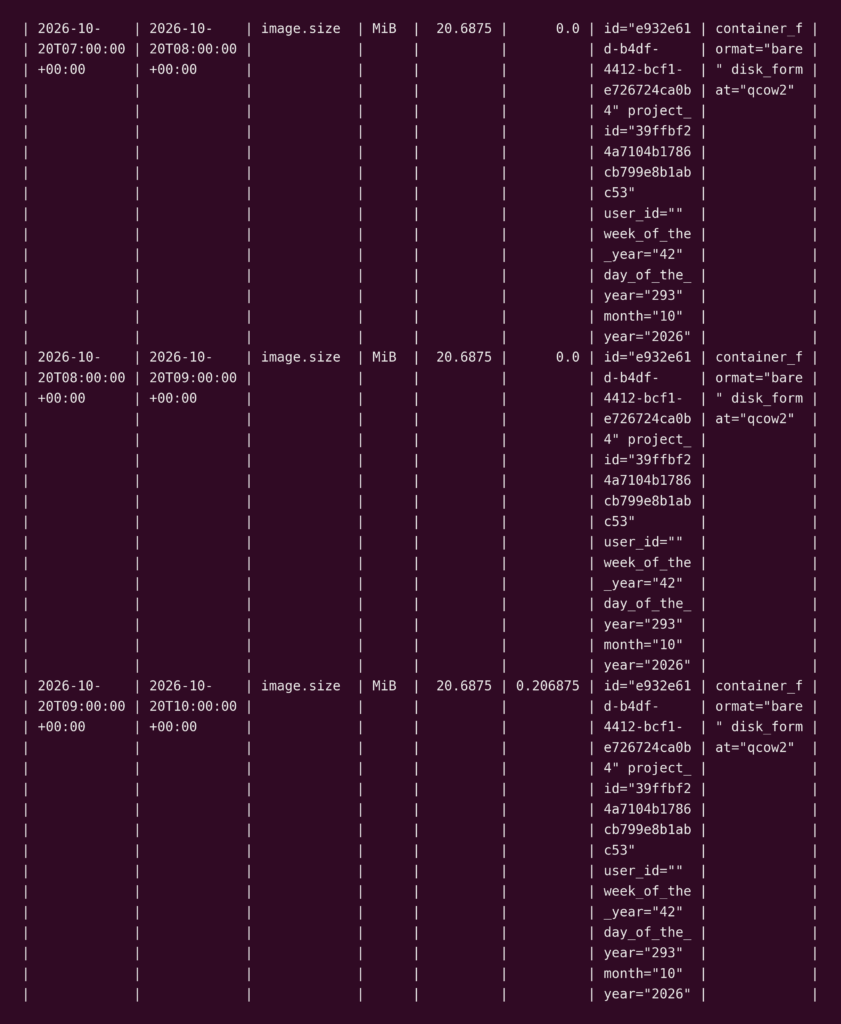
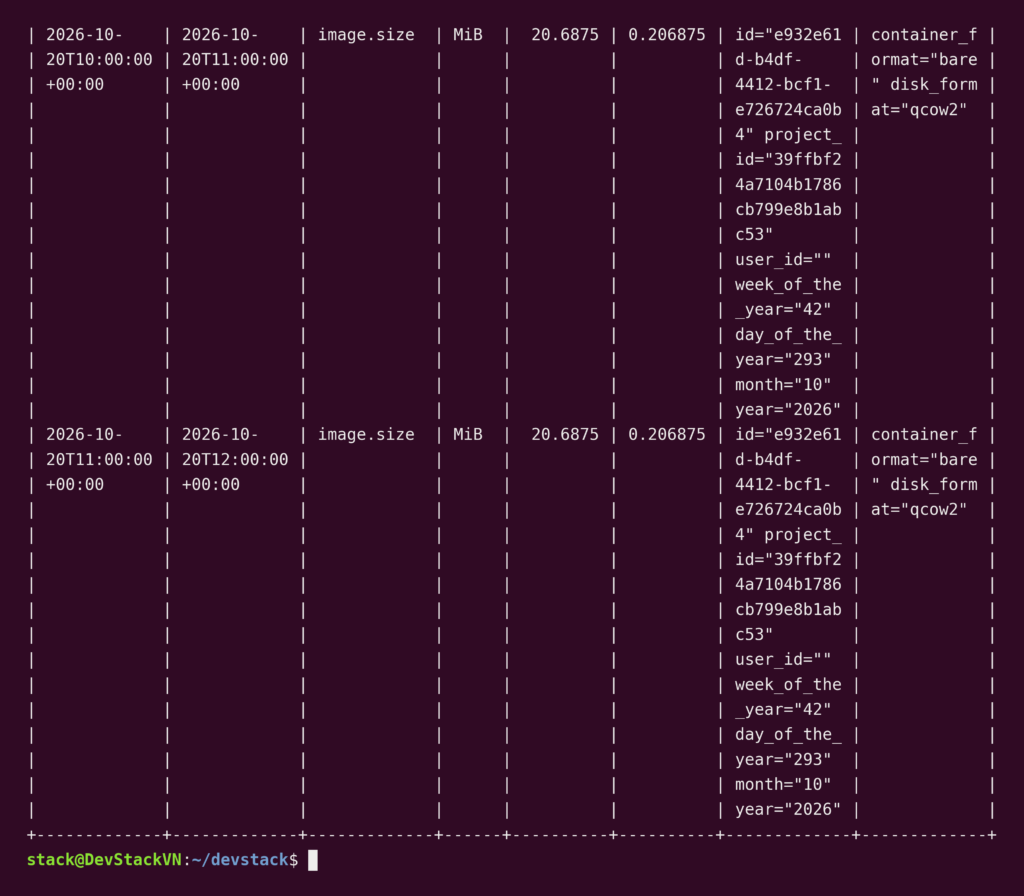
Step 8: The result
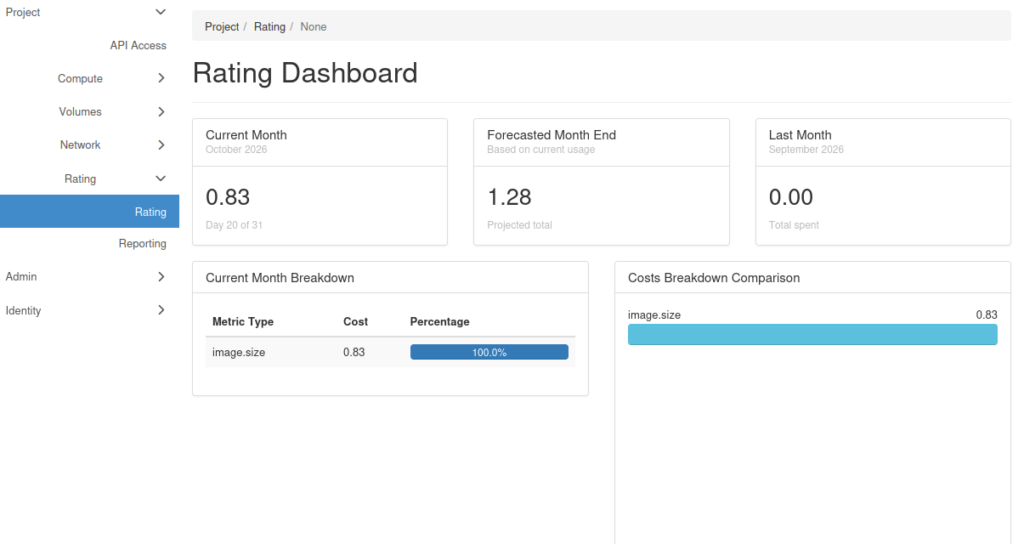
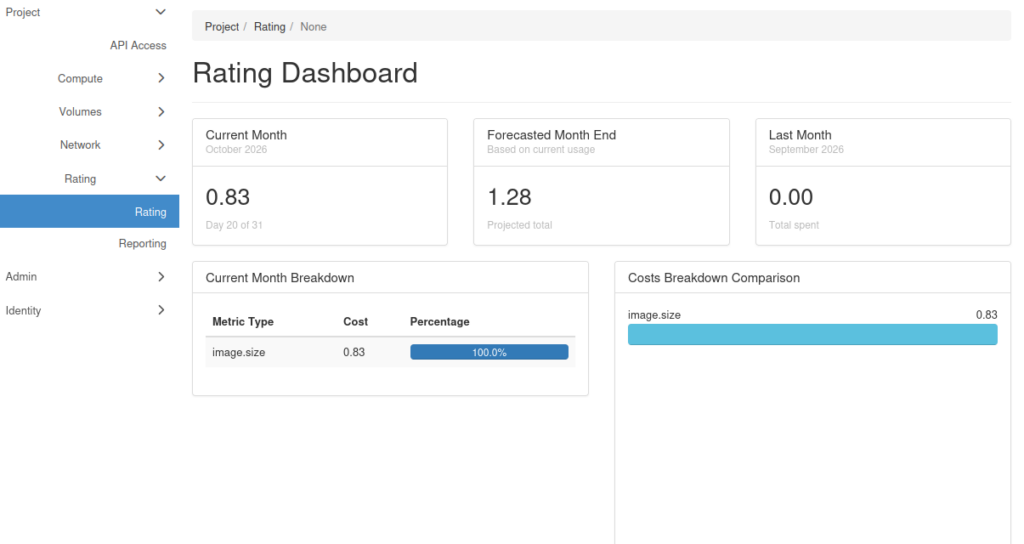
- The dashboard now shows 0.83 for the month, a forecast of 1.28, and
image.sizeas 100 percent of the breakdown.
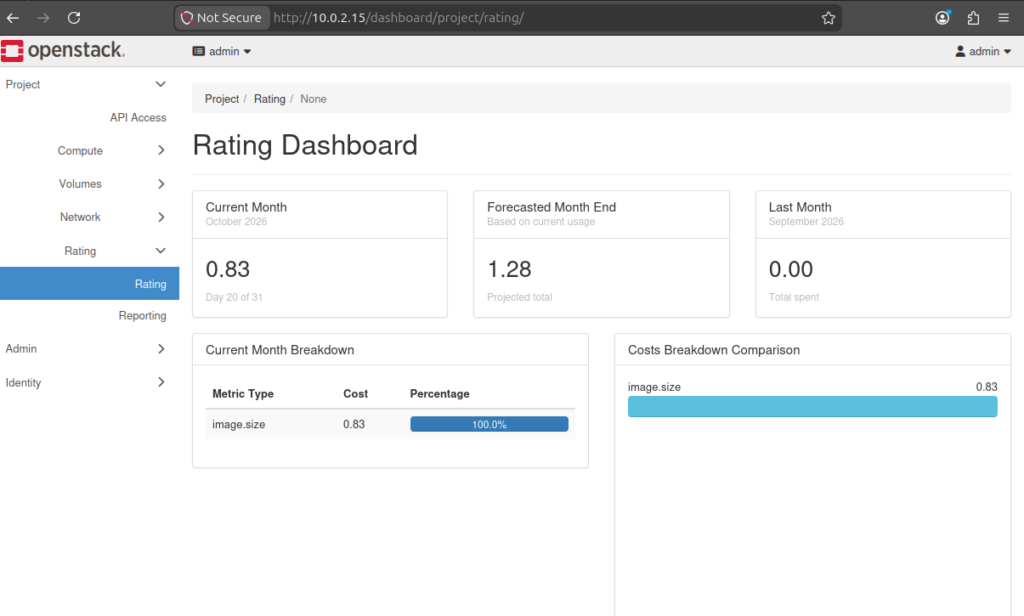
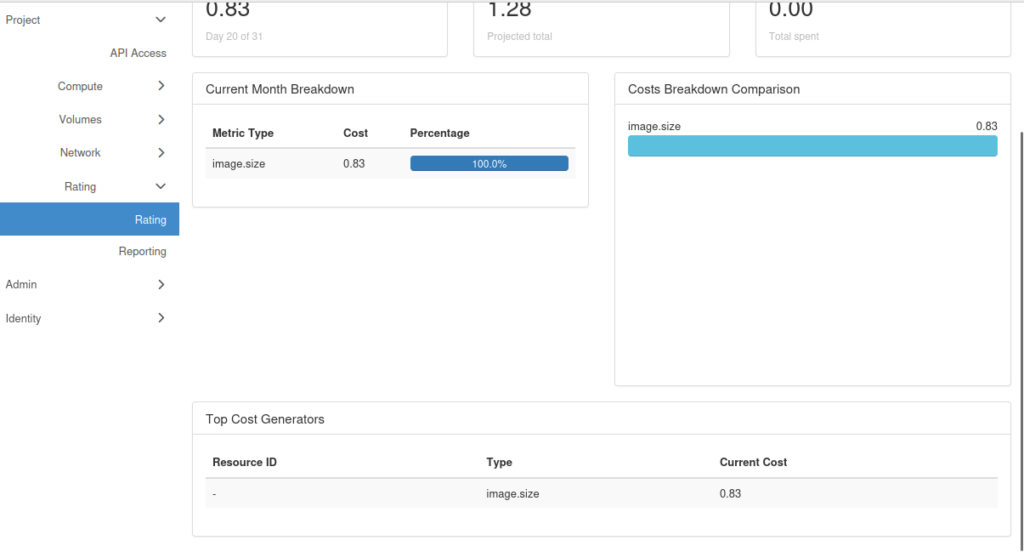
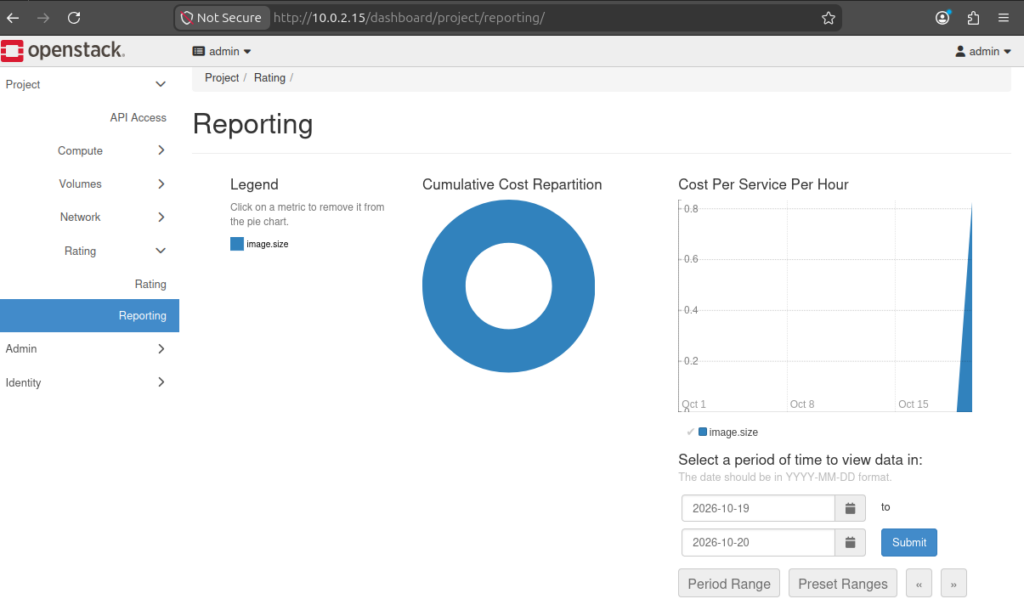
The 0.83 comes from the price we set: 0.01 per MiB for each hour. The provider chooses the prices, and CloudKitty doesn’t care about currency. The unit is yours to decide: euros, dollars, cents, or squirrels.
Two details help when you work out your own prices.
First, CloudKitty prices each hour, so a monthly price has to be converted. A 30-day month has 720 hours. To charge 5 per GiB per month, divide 5 by 720, which is about 0.0069 per GiB per hour.
Second, the price applies to the quantity CloudKitty stores. For image.size, the quantity is in MiB, so our 0.01 is per MiB, or 10.24 per GiB for every hour.
Even a correct price can give a lower total than you expect. In our test, an hour went unpriced because the mapping started partway through it. Let’s explore more gotchas next.
Seven Gotchas Before You Trust the Numbers
- In CloudKitty, the hour that contains a mapping’s start stays unpriced. In our CloudKitty test on DevStack, the
image.sizemapping started at 08:04:04. The 08:00–09:00 hour has a price of 0.0, and 09:00–10:00 is the first priced hour. Thevolume.sizemapping started at 13:57:43, and its 13:00–14:00 hour also has a price of 0.0. Create mappings before the usage you want priced, and expect the hour you create them to read 0.0.

openstack rating hashmap mapping create for the volume.size service in our CloudKitty test. The flat price is 0.02 and the mapping start date is 2026-10-20T13:57:43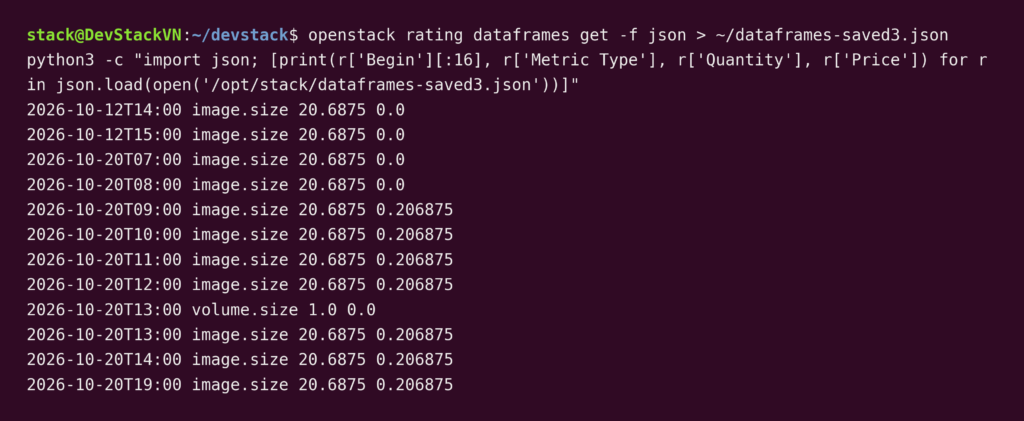
2. CloudKitty’s hashmap module starts disabled. The hashmap module applies mapping prices, and it is disabled by default. A correct mapping prices nothing until you run openstack rating module enable hashmap
3. A CloudKitty metric with no service has a cost of zero. CloudKitty collects and stores the metric anyway. In our test, the Rating dashboard listed image.size at 0.00 until we created a service for it.
4. A running CloudKitty mapping cannot be edited. To change a price, delete the mapping and create a new one.
5. In CloudKitty, mapping a service and one of its fields charges twice. If you map a service and a field of that service, CloudKitty charges both.
6. A wrong aggregation method hides a metric in CloudKitty. The Gnocchi collector defaults to max, but Ceilometer’s default archive policies don’t support it. Gnocchi then returns a 404, and the docs recommend mean. The image.size entry in our metrics.yml sets mean.
7. CloudKitty timestamps are in UTC. Every Begin and End value in openstack rating dataframes get ends in +00:00. Compare your mapping’s start time against UTC to see which hour goes unpriced.
Those gotchas are about getting CloudKitty’s numbers right. The next section covers what CloudKitty does not do, however you configure it.
What CloudKitty Doesn’t Do
CloudKitty rates usage and stores the result. It stops there.
CloudKitty cannot limit resources in other OpenStack services. It rates and only rates, so it can’t, for example, block instance creation in Nova above a certain price.
CloudKitty does not add taxes or convert currencies. A billing system has to do that. CloudKitty attaches a price to a metric for a period, and the unit of that price is whatever you choose.
CloudKitty does not generate invoices, handle payments or manage customers. Its v1 and v2 API references cover dataframes, scope state, summaries, reports, price quotes, tasks and rating modules. They list no endpoints for invoices, payments, taxes, currencies or customers.
What you get is rated usage, grouped by scope or metric type, and the Horizon Rating and Reporting pages show it.
To go from rated usage to a bill, you add billing software on top of CloudKitty.
Where OSIE Fits
CloudKitty is enough when the goal is showback: showing each project or team what its usage costs. OSIE fits when that grows into billing customers.
OSIE prices usage with its own plans. Price plans set a price per resource attribute, charged per minute, hour or month. A periodic billing job adds each charge to the customer’s open bill.
OSIE issues invoices. It generates and delivers invoices automatically, using PDF templates that include tax calculations.
OSIE collects payment. It supports Stripe, PayPal, Razorpay, HyperPay, Xendit, BTCPay Server and bank transfer, with prepaid wallets or postpaid accounts with credit limits.
OSIE suspends customers who don’t pay. Suspension rules include grace periods, and customers are reactivated when they pay.
OSIE gives customers a self-service portal. Customers create instances, networks and volumes, add a credit card and see their invoices.
Conclusion
OpenStack does not ship a bill, but CloudKitty gives you the rating layer. It reads usage from Gnocchi or Prometheus, applies the prices you define and stores the result. In our DevStack test, image.size went from 0.00 to 0.206875 per hour once we enabled the hashmap module, created a service and added a flat mapping of 0.01 per MiB.
CloudKitty settles what each project and metric type costs, at prices you define. It leaves open invoices, tax, currency conversion and payments.
If you need to show teams what they use and what it costs, CloudKitty covers it. If customers pay you, you need billing software on top. OSIE is one: it issues invoices, applies tax and collects payment for OpenStack.
Try the OSIE Free Edition: https://osie.io/free