OpenStack Horizon vs OSIE: Why Dashboard Performance Is an Architecture Problem
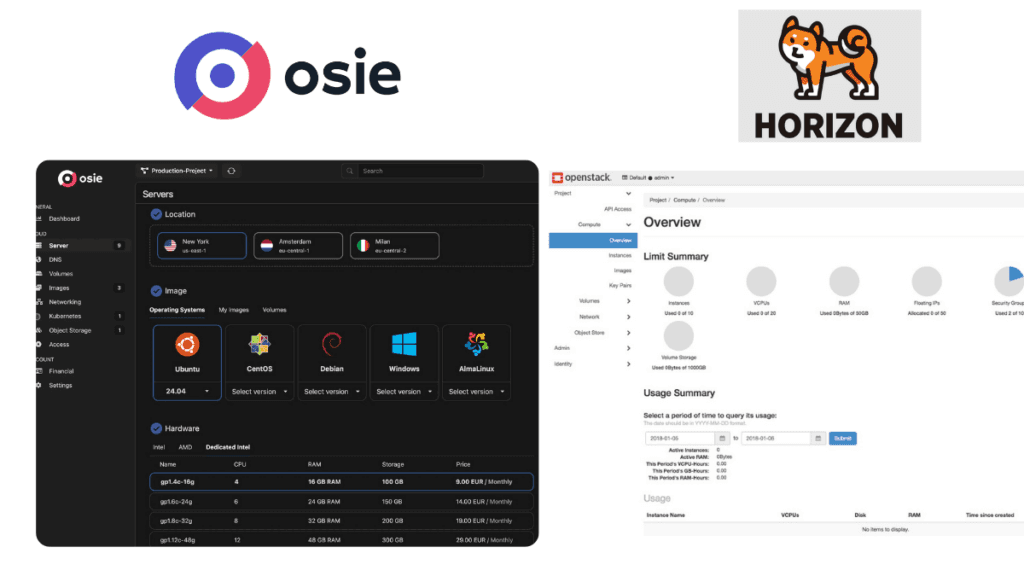
If you’ve used Horizon for any meaningful amount of time, you already know the pain. You click “Instances” and you wait. You click “Networks” and you wait some more. Users open support tickets because the dashboard “feels broken.” Some give up on the UI entirely and fall back to the OpenStack CLI because it’s genuinely faster than waiting for a page to load.
This isn’t a rant. This is a technical breakdown of why Horizon is architecturally slow, what OSIE does differently, and why the performance gap isn’t marginal — it’s structural.
Why Horizon Is Slow: How It Actually Talks to OpenStack
Horizon is Django. That’s the first thing to understand. Every page you load in Horizon is server-side rendered — the backend fetches data from OpenStack APIs, assembles HTML on the server, and ships the entire page to your browser. There is no client-side application in any meaningful sense. The frontend is jQuery, Bootstrap 3, and AngularJS 1.x — a stack that was already legacy when Horizon adopted it.
But the rendering model isn’t even the real problem. The real problem is how Horizon talks to OpenStack.
Sequential, Blocking, Redundant
When you open the instance listing in Horizon, here’s what actually happens behind the scenes:
- Fetch all flavors from Nova
- Fetch all images from Glance (twice — once for regular images, once for community images)
- Fetch all volumes from Cinder
- Fetch the instance list from Nova
- For every instance on the page, make an additional call to Neutron to sync IP addresses
That last one deserves emphasis. Horizon makes a separate network call to Neutron for IP address synchronization on every single page load of the instance list. The Horizon codebase itself has a TODO comment acknowledging this is a performance problem. It’s been there for years.
The network listing page is similarly painful. It fetches all networks, then separately fetches every subnet in the project — not just the subnets attached to the visible networks, all of them — and then correlates them in Python. If an SSL error occurs during this process, it retries up to three times, adding even more latency.
No Caching Worth Mentioning
Horizon has a memoization decorator that caches API results. Sounds promising until you realize it’s scoped to a single HTTP request. When the request ends, the cache is gone. The next page load, the next user, the next click — everything starts from zero.
There is no cross-request caching of API results. Flavor lists don’t change every second, but Horizon fetches them fresh on every page view for every user. Image catalogs are relatively static, but they get pulled twice per instance listing, per request, per user.
The only persistent cache is Memcached, and it’s used exclusively for session storage — not for API results.
Server-Side Rendering as a Bottleneck
Because Horizon renders everything server-side, the browser gets nothing until the backend has finished all its API calls, correlated all the data, and generated the complete HTML. There’s no progressive loading, no streaming, no skeleton screens. If one OpenStack API is slow — and they can be — the entire page hangs.
The middleware chain doesn’t help either. Twelve middleware classes process every single request: authentication validation, CSRF checking, profiling, theme resolution, locale detection. All of this runs before a single byte of useful content reaches the user.
How OSIE Approaches This Differently
OSIE wasn’t built to patch Horizon’s problems. It was built from scratch with a fundamentally different architecture — a dedicated API layer sitting between the frontend and OpenStack, and a modern single-page application on the client side.
This separation is not cosmetic. It changes everything about how data flows to the user.
Multi-Layer Caching
The most impactful architectural difference is OSIE’s caching strategy. Instead of hitting OpenStack APIs raw on every request, OSIE implements caching at multiple levels:
Server-side persistent cache. The OSIE API maintains a TTL-based cache backed by the database. When a user requests a list of flavors, images, or other relatively stable resources, the API serves from cache if the data is fresh. This alone eliminates the majority of redundant OpenStack API calls that Horizon makes.
Distributed cache with stampede prevention. When cached data expires, OSIE doesn’t let every concurrent request hammer OpenStack simultaneously. It uses distributed locking to ensure only one request refreshes the cache while others continue serving the stale-but-recent data. This is critical under load — it’s the difference between a cache miss causing one API call versus a hundred.
Client-side model cache. The frontend maintains its own in-memory data store. Resources that have already been fetched don’t need to be re-fetched when navigating between pages. Click from an instance detail view back to the list? The list is already in memory.
Real-time cache invalidation via Server-Sent Events. Rather than polling or refetching on a timer, the API pushes resource state changes to the frontend in real time. When an instance changes state, the UI updates immediately without a full page reload or a fresh API call. This means the cache stays accurate without constant invalidation.
The net effect: most page navigations in OSIE don’t touch OpenStack at all.
Parallel, Not Sequential
Where Horizon makes sequential, blocking API calls to OpenStack, OSIE’s API uses parallel execution extensively. Resource fetches that are independent of each other run concurrently using modern concurrency primitives that scale to thousands of parallel operations without the overhead of traditional thread pools.
When the API does need to reach out to OpenStack, it batches and parallelizes those calls. Fetching compute, network, and storage data happens simultaneously, not one after another.
Client-Side Application, Not Server-Rendered Pages
OSIE’s frontend is a full single-page application. The browser loads the application once, and subsequent navigation is handled client-side. Page transitions don’t require a full server round-trip. Data is fetched asynchronously and rendered progressively — you see a page skeleton immediately, then data populates as it arrives.
This means even when data does need to be fetched, the perceived performance is dramatically better. The UI remains responsive while data loads in the background.
Data Grids Built for Scale
Horizon renders HTML tables server-side. For a project with hundreds of instances or volumes, the server generates hundreds of table rows as HTML, ships them to the browser, and the browser renders them all at once.
OSIE uses enterprise-grade data grids with virtual scrolling, client-side sorting and filtering, and configurable pagination. The browser only renders the rows that are visible in the viewport. Combined with client-side fuzzy search, users can find resources instantly without waiting for a server round-trip.
The Performance Gap in Practice
This isn’t about shaving off milliseconds. In real deployments, Horizon page loads for instance listings commonly take 3-8 seconds, and can stretch beyond that in environments with many resources or high API latency. OSIE’s architecture brings that down to sub-second territory because most navigations are served from cache without reaching OpenStack.
The difference compounds with scale. As a cloud grows — more instances, more networks, more volumes — Horizon gets linearly slower because it re-fetches everything on every page load. OSIE’s cached architecture means page load times stay roughly constant regardless of how many resources exist in the environment.
For both operators and their customers, this isn’t just a cosmetic concern. Slow dashboards generate support tickets. They erode confidence. They make a cloud platform feel unreliable even when the underlying infrastructure is perfectly healthy.
Beyond Performance: What OSIE Adds to the Table
Speed aside, OSIE covers significant ground that Horizon simply doesn’t address. These aren’t edge features — they’re table stakes for anyone running a cloud as a business.
Billing and Revenue Management
Horizon has no concept of billing. It’s a resource management dashboard, nothing more. If you want to charge customers for their usage, you need to bolt on a separate billing system, integrate it with OpenStack metering, build invoice generation, handle payment processing, and maintain all of that yourself.
OSIE ships with a complete billing engine. Pay-per-minute metering across compute, storage, and networking resources. Automatic invoice generation with customizable PDF templates. Seven payment gateways out of the box — Stripe, PayPal, Razorpay, HyperPay, Xendit, BTCPay Server, and bank transfers. Multi-currency support with tax rule configuration. Savings plans for reserved capacity. Promotional credits. Dunning management for failed payments with automated suspension and grace periods.
Billing is part of the core data model, not a bolt-on.
Multi-Tenancy and Organizations
Horizon’s multi-tenancy model is whatever Keystone provides — projects and domains. There’s no concept of organizations, team management, or hierarchical access control beyond what OpenStack’s identity service offers natively.
OSIE implements a full organization layer with role-based access control, member invitations, audit logging of all changes, and project-scoped resource isolation. Customers can manage their own teams without operator intervention.
Self-Service Customer Onboarding
In Horizon, onboarding a new customer means an operator manually creating a Keystone project, assigning roles, and somehow communicating credentials. There is no self-service registration flow.
OSIE provides a complete self-service journey: sign up, email verification, payment method registration, optional KYC verification, automatic project provisioning, and immediate access to deploy resources. Horizon has no equivalent workflow.
Administration and Operations
Horizon’s admin panel is limited to basic OpenStack administration — managing services, quotas, and users within the OpenStack context.
OSIE includes a separate, purpose-built administration dashboard with platform configuration, billing administration, pricing rule management, audit event tracking and export, admin-specific RBAC with granular permissions, and system-wide settings management. It covers the operational side that Horizon leaves to external tooling.
White-Label and Branding
Horizon is Horizon. You can change the logo and some colors, but it’s recognizably the OpenStack dashboard.
OSIE is built for white-labeling from the ground up — custom branding, custom CSS and JavaScript injection, configurable authentication strategies, and custom menu items. Cloud providers can present it as their own product.
Modern Authentication
Horizon authenticates directly against Keystone with username and password. OSIE supports full OAuth2/OIDC flows, WebAuthn passkeys, TOTP two-factor authentication, and SSO integration. These are built into the authentication layer, not added after the fact.
Multi-Region and Multi-Cloud
Horizon connects to a single OpenStack deployment. OSIE’s architecture supports managing resources across multiple OpenStack regions and even multiple independent OpenStack deployments from a single interface, with per-service and per-region resource scoping.
Real-Time Everything
Horizon shows you a snapshot of state at the moment the page loaded. To see if your instance finished building, you refresh the page and wait for all those API calls again.
OSIE streams state changes via Server-Sent Events. Instance status transitions, volume attachments, network changes — they show up in the UI as they happen. No refresh needed.
Comparing the Stacks
| Horizon | OSIE | |
|---|---|---|
| Backend | Django (Python), server-side rendering | Java API layer, API-first architecture |
| Frontend | jQuery + AngularJS 1.x + Bootstrap 3 | Modern SPA + Bootstrap 5 + enterprise data grids |
| Caching | Request-scoped memoization only | Multi-layer: server cache, distributed cache with stampede prevention, client-side store, SSE invalidation |
| API pattern | Sequential blocking calls to OpenStack | Parallel execution, batched operations |
| Page rendering | Full server-side HTML generation | Client-side SPA with progressive data loading |
| Data tables | Server-rendered HTML tables | Virtual-scrolling data grids with client-side search |
| Real-time updates | None (manual refresh) | Server-Sent Events |
| Billing | None | Full metering, invoicing, payments, dunning |
| Self-service | None | Complete onboarding flow with KYC |
| Multi-region | Single deployment | Multi-region, multi-OpenStack |
| Authentication | Keystone username/password | OAuth2/OIDC, WebAuthn, TOTP, SSO |
| Admin tooling | Basic OpenStack admin | Dedicated operations dashboard with RBAC |
| Internationalization | Community-contributed translations | 5 languages with full locale support |
| Payment processing | None | 7 payment gateways |
The Bottom Line
Horizon was built as a reference implementation. It was never designed to be fast, and it was never designed to run a cloud business. It’s a dashboard for looking at OpenStack resources, and even at that narrow task, its architecture ensures it will always be slow.
OSIE was built for operators who sell cloud infrastructure. The performance difference isn’t a feature — it’s a consequence of fundamentally different architectural decisions. Caching that actually persists. API calls that run in parallel. A frontend that doesn’t wait for the server to render HTML. A data layer that pushes changes instead of requiring constant polling.
If you’re running Horizon in production and dealing with constant complaints about dashboard performance, the problem likely isn’t configuration or tuning. It’s the architecture itself.